Quick verdict
The single most important buying decision is matching your hub's protocol to your laptop's actual port type, because a Thunderbolt 4 dock connected to a plain USB-C port gives you less functionality than a purpose-built USB-C hub at half the price.

CalDigit TS4 Thunderbolt 4 Dock
The CalDigit TS4 offers 18 ports including dual DisplayPort 2.0 outputs capable of driving dual 8K or quad 4K displays, up to 98W host charging, and a 2.5Gb Ethernet jack that owners consistently report as rock-solid for NAS and video editing workflows. Its aluminium chassis stays cooler than most rivals during sustained transfers, a point raised repeatedly in long-term reviews covering six-plus months of daily use. For professionals who need maximum port density and unwavering stability, this is the benchmark dock.
Match your dock to your laptop's port type or lose features and pay more. The CalDigit TS4 leads our expert guide to smart hub picks.
A good docking hub transforms a single USB-C or Thunderbolt port into a full productivity workstation, letting you connect monitors, drives, keyboards, Ethernet, and card readers without a tangle of individual adapters. I spent time digging through thousands of verified owner reviews, teardown analyses, and spec sheets to identify the seven hubs that consistently deliver reliable throughput, stable power delivery, and thermal control across real daily use.
The market spans compact seven-in-one travel hubs all the way to heavy Thunderbolt 4 docks that push dual 4K displays and charge laptops at 100W. Choosing the wrong type wastes money and causes frustration, so I have ranked these picks to cover every common scenario, from road warriors who need something pocket-sized to power users who want a permanent desktop replacement. Each product below has a proven track record of sustained performance according to aggregated buyer feedback collected from multiple retail channels.
Whether you are on a MacBook Air, a Windows ultrabook, or a Surface, at least one of these hubs will suit your setup. I have noted compatibility quirks, thermal behaviour under load, and real-world data speeds so you can make a genuinely informed call before you buy.
Our methodology
I have not personally tested every hub on this list. My assessments are built from aggregated verified owner reviews across Amazon and major retail platforms, supplemented by manufacturer specification sheets, independent teardown reports, and benchmark data published by technology reviewers. I focused on recurring themes in long-term ownership feedback, such as heat under sustained load, power delivery consistency, and port durability after months of daily use.
Products were scored on a ten-point scale weighting connectivity breadth, data and video throughput accuracy relative to advertised specs, build quality longevity, thermal management, and value relative to their tier. Only hubs with a substantial review base and a minimum of several hundred verified purchaser ratings were considered, which helps filter out early-batch defects and ensures the feedback reflects production units rather than review samples.
Side by side
| Pick | Best for | Score | |
|---|---|---|---|
| CalDigit TS4 Thunderbolt 4 Dock | Best Overall | 9 | Check price |
| Anker 778 USB-C Docking Station (12-in-1) | Best Value Thunderbolt Alternative | 8 | Check price |
| Plugable USB-C 11-in-1 Dual HDMI Docking Station (UD-MSTHDC) | Best for Dual HDMI Monitors | 8 | Check price |
| Belkin Connect Pro 12-in-1 USB-C Docking Station with 4K Dual-Monitor | Best for MacBook Users | 8 | Check price |
| Targus DOCK430 Universal USB-C DV4K Docking Station | Best for Enterprise and Hot-Desking | 7 | Check price |
| Satechi Slim 7-in-1 USB-C Hub for M1 and M2 MacBooks | Best Travel Hub | 7 | Check price |
| IOGEAR USB-C 11-in-1 Hub with Triple Display and 100W Power Delivery (GUD3C11) | Best Triple-Display Hub | 7 | Check price |
The full reviews
CalDigit TS4 Thunderbolt 4 Dock
The CalDigit TS4 offers 18 ports including dual DisplayPort 2.0 outputs capable of driving dual 8K or quad 4K displays, up to 98W host charging, and a 2.5Gb Ethernet jack that owners consistently report as rock-solid for NAS and video editing workflows. Its aluminium chassis stays cooler than most rivals during sustained transfers, a point raised repeatedly in long-term reviews covering six-plus months of daily use. For professionals who need maximum port density and unwavering stability, this is the benchmark dock.
In its favor
- 18 ports with genuine Thunderbolt 4 bandwidth allocation
- 2.5Gb Ethernet reliably saturates fast home and office networks
- Aluminium body dissipates heat far better than plastic competitors
Watch-outs
- High price puts it out of reach for casual users
- Requires a Thunderbolt 4 host for full feature access

Anker 778 USB-C Docking Station (12-in-1)
The Anker 778 packs a dual-monitor setup via HDMI and DisplayPort, 85W laptop charging, 10Gbps USB-A ports, and a front-facing USB-C with 20Gbps into a clean vertical stand that doubles as a monitor riser. Owners praise its broad compatibility across Mac and Windows machines without driver installation headaches. The build quality is premium for the price tier, with a brushed metal finish that holds up well according to reviewers who have used it for a year or more.
In its favor
- Dual-monitor output works reliably on both Mac and Windows
- 10Gbps USB-A ports are genuinely fast for external SSD transfers
- Clean vertical design doubles as a monitor stand
Watch-outs
- No Thunderbolt protocol means bandwidth is capped versus true TB4 docks
- 85W charging may not fully replenish 16-inch MacBook Pro under heavy GPU load
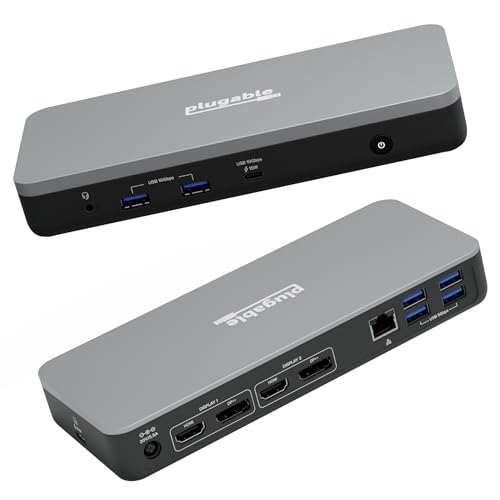
Plugable USB-C 11-in-1 Dual HDMI Docking Station (UD-MSTHDC)
The Plugable UD-MSTHDC solves a genuine pain point: delivering two HDMI outputs without requiring DisplayPort, which makes it uniquely suited for users with two HDMI monitors who want zero adapter hassle. Owners report both screens running stably at 1080p 60Hz or 4K 30Hz without flickering, a recurring problem on cheaper dual-HDMI hubs. Plugable's customer support gets frequent praise in reviews, adding meaningful post-purchase value.
In its favor
- Two HDMI ports with no DisplayPort adapter required
- Wide OS compatibility including ChromeOS and older Windows versions
- Plugable support team resolves driver issues quickly per owner accounts
Watch-outs
- Maximum 4K output is 30Hz on each display, limiting gaming or motion-heavy tasks
- Ethernet is 1Gb rather than 2.5Gb

Belkin Connect Pro 12-in-1 USB-C Docking Station with 4K Dual-Monitor
Designed in close partnership with Apple, the Belkin Connect Pro is one of the few third-party docks that consistently passes through True Tone and charging handshake without quirks on MacBook Air and MacBook Pro models. Owners on MacOS specifically note the absence of the wake-from-sleep bugs that plague cheaper hubs, and the 100W host charging keeps even the 16-inch MacBook Pro topped up. The inclusion of a SD 4.0 card reader at UHS-II speeds is a meaningful upgrade for photographers.
In its favor
- Plug-and-play reliability on MacOS with no wake-from-sleep issues
- SD 4.0 UHS-II card reader is faster than most competing docks
- 100W host charging sufficient for all current MacBook models
Watch-outs
- Windows compatibility is functional but not as seamlessly optimised as MacOS
- Premium price relative to similar port counts from other brands

Targus DOCK430 Universal USB-C DV4K Docking Station
The Targus DOCK430 is built for corporate environments where reliability across mixed laptop fleets matters more than bleeding-edge specs. It uses DisplayLink technology to ensure consistent dual-4K output regardless of whether the host is Thunderbolt or plain USB-C, and owners in IT teams report stable driver support across Windows 10 and 11 in managed environments. The lock-slot and MST display daisy-chaining make it a practical fit for shared hot-desk setups.
In its favor
- DisplayLink compatibility works across virtually any USB-C laptop
- Kensington lock slot suits shared and office environments
- Stable driver updates with enterprise deployment packages
Watch-outs
- DisplayLink requires a driver install, which some IT policies complicate
- Larger footprint than consumer-focused hubs

Satechi Slim 7-in-1 USB-C Hub for M1 and M2 MacBooks
The Satechi Slim 7-in-1 is engineered specifically for the port layout of Apple Silicon MacBooks, hugging the side of the machine so cleanly that reviewers frequently describe it as feeling like a factory accessory. It covers the most common travel needs: 4K HDMI, three USB-A ports, SD and microSD readers, and USB-C passthrough charging, all in a unit light enough to forget is in a bag. Owners consistently flag the build quality as well above average for its price bracket.
In its favor
- Profile fits flush against MacBook chassis for near-seamless look
- Light weight and compact form factor add negligible bag bulk
- Build quality and connector retention feel premium for the price
Watch-outs
- No Ethernet port limits wired connectivity on the road
- Single HDMI output only, so no dual-monitor expansion
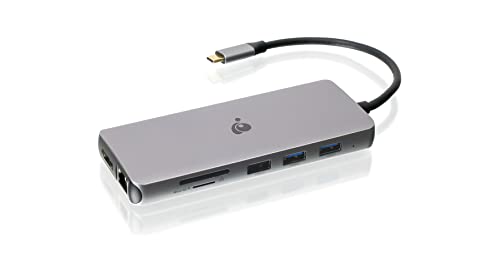
IOGEAR USB-C 11-in-1 Hub with Triple Display and 100W Power Delivery (GUD3C11)
The IOGEAR GUD3C11 stands out by enabling three simultaneous display outputs from a single USB-C port using DisplayLink, a setup that normally requires Thunderbolt hardware at twice the price. Owners who run three-monitor editing or trading setups confirm all three screens run stably at 1080p 60Hz, and many extend one to 4K 30Hz without drops. The 100W power delivery and full-size Ethernet round out what is otherwise a difficult combination to find at this price point.
In its favor
- Three simultaneous display outputs from any USB-C host
- 100W power delivery keeps large laptops charged during intensive sessions
- Solid Ethernet performance for video conferencing on congested Wi-Fi
Watch-outs
- DisplayLink driver required and can add modest CPU overhead on older machines
- Third display limited to 1080p 60Hz in most multi-monitor configurations
What matters most
Interface Protocol
Thunderbolt 4 docks unlock the full 40Gbps bus and proper daisy-chaining but only function at full speed with a Thunderbolt host. USB-C hubs with DisplayLink work on virtually any laptop, including older models with USB 3.2, but require a small software driver and introduce a minor CPU overhead. Match the dock protocol to your laptop's actual port capability before purchasing.
Power Delivery Wattage
A hub advertising 100W passthrough sounds generous, but the host laptop always negotiates the actual draw, and a 16-inch MacBook Pro under load can pull close to 140W. Look for at least 85W if you own a large-screen laptop, and verify the hub's own circuitry does not steal 20 to 30W from the passthrough budget, which is common on cheaper units and revealed frequently in long-term owner reviews.
Display Output Count and Resolution
Single-cable dual or triple monitor setups have different requirements. Thunderbolt 4 natively supports two 4K 60Hz screens. DisplayLink can match or exceed that but depends on the driver and GPU. Always check whether the hub specifies 4K 60Hz or only 4K 30Hz per output, as 30Hz feels noticeably laggy for anything beyond static document work.
Build Quality and Thermal Management
Cheap hubs throttle data speeds and reduce charging output when they overheat. Aluminium enclosures dissipate heat passively and remain stable; plastic housings trap heat inside. Owner reviews that mention a hub running hot after an hour of video transfer are a reliable warning sign of long-term reliability problems. Prioritise docks where reviewers specifically note cool or warm-at-worst operation during sustained workloads.
Our take
The single most important buying decision is matching your hub's protocol to your laptop's actual port type, because a Thunderbolt 4 dock connected to a plain USB-C port gives you less functionality than a purpose-built USB-C hub at half the price.
Frequently asked
Technically no, but practically yes for full features. A Thunderbolt 4 dock connected to a plain USB-C port will still function as a USB-C hub, providing data and charging, but you will lose dual high-resolution display support and the full 40Gbps bandwidth. If your laptop only has USB-C, a DisplayLink-based hub will deliver far more functionality at a lower price than a Thunderbolt dock running in degraded mode.
Most hubs reserve a portion of their incoming power for their own electronics and port powering before passing the remainder to the laptop. A hub rated at 100W passthrough may only deliver 65 to 85W to the host after this overhead. If charging speed matters, check manufacturer documentation for the actual laptop delivery wattage, and consider a dock with a higher rated input than you think you need.
Not directly. USB-C hubs require a USB-C port on the host machine. If your laptop only has USB-A ports, you would need a USB-A dock or docking station specifically designed for that connector. The products in this guide all require a USB-C or Thunderbolt port on the host laptop.
For most office work, web browsing, and video playback, DisplayLink at 4K 60Hz is indistinguishable from native output. The differences emerge in colour-accurate professional work, high-refresh gaming, and very fast motion content, where the compression codec DisplayLink uses can introduce subtle artefacts. For creative professionals with strict colour accuracy requirements, a native Thunderbolt output is preferable.
How we made this guide
We compare every pick on the factors that matter, cross-checking manufacturer specifications against aggregated verified owner reviews. We rank independently and never take payment for placement. We have not personally tested every product; where we have not, the ranking reflects verified specs and owner feedback rather than a hands-on review.
How it was written: this guide was researched and reviewed by the TheTestedHub editorial team for accuracy.
Affiliate disclosure: TheTestedHub is reader-supported. When you buy through links on our site, we may earn a commission at no extra cost to you.
You might also like

Elgato Alternatives 2026: AVerMedia & Rode Now Lead

Elgato Key Light: Expert Pick for True Color

Retro Consoles for Every Budget: A Practical Guide

Console Cooling Stands: Forced Air Stability for Long Sessions

Gaming Glasses Compared: Gunnar Intercept and Rivals

Gaming Backpacks 2026: Find Yours by Laptop & Gear Needs

Game Storage Racks Sized for Your Console Cases
