Quick verdict
For the best CarPlay experience in 2026, prioritize USB 3.0 or higher data speeds and at least 30W charging, with MFi certification non-negotiable. The Anker PowerLine III+ offers the best balance of speed, power, and durability for USB-C iPhones, while Belkin's BoostCharge Pro is the top choice for Lightning users.

Anker PowerLine III+ USB-C to USB-C Cable (6ft)
Anker's PowerLine III+ offers USB 3.1 data speeds (10Gbps) for instant CarPlay response and 100W charging for iPhones and laptops. Verified owners praise its braided nylon build and reinforced connectors that last over a year without fraying. It's the most reliable cable for consistent CarPlay connections, with over 15,000 positive reviews.
For a flawless CarPlay experience in 2026, prioritize fast data and 30W charging with MFi certification. The Anker PowerLine III+ leads for USB C iPhones, while Belkin BoostCharge Pro is top for Lightning users.
Choosing the right iPhone cord for CarPlay in 2026 means balancing data transfer speed, charging capability, and durability. With USB-C now standard on iPhones, the market has shifted to USB-C to USB-C and USB-C to Lightning cables that support fast charging and reliable CarPlay connectivity. I spent hours comparing specs, reading verified owner reviews, and checking compatibility with the latest iOS and car models to find the best options.
All picks are MFi-certified (Made for iPhone) to ensure they work seamlessly with CarPlay and won’t trigger warning messages. I focused on cables that support USB 3.0 or higher data speeds for lag-free navigation and media streaming, as well as 60W or higher charging to keep your phone powered during long drives. Build quality matters too-braided nylon and reinforced connectors help these cables survive daily use.
Note that some newer cars have USB-C ports that can deliver up to 100W, so a cable that can handle that power is future-proof. I excluded cables that lack verified MFi certification or have consistent reports of CarPlay disconnects. Below are my top five picks based on real-world feedback and technical specs.
How we evaluated these
To find the best iPhone cords for CarPlay in 2026, I started by identifying all MFi-certified cables from major brands and newer entrants. I then filtered for those with at least 1000 verified reviews on Amazon and other retailers, focusing on CarPlay-specific feedback. I compared data transfer speeds (USB 2.0 vs 3.0 vs 3.1), charging wattage (20W to 240W), connector types (USB-C to Lightning vs USB-C to USB-C), and cable length (3ft to 6ft).
I read through hundreds of reviews, noting common praise and complaints about CarPlay connectivity, durability, and charging speed. I also checked compatibility with iPhone 15 and later models (USB-C) and older iPhones (Lightning). Finally, I cross-referenced specs with manufacturer websites to ensure accuracy. No physical lab tests were conducted; all claims are based on published specs and user experiences.
The shortlist
| Pick | Best for | Score | |
|---|---|---|---|
| Anker PowerLine III+ USB-C to USB-C Cable (6ft) | Best Overall | 9 | Check price |
| Belkin BoostCharge Pro USB-C to Lightning Cable (4ft) | Best for Lightning iPhones | 8.5 | Check price |
| UGREEN USB-C to USB-C Cable (3.3ft) | Best Value | 8 | Check price |
| Nomad Goods Kevlar USB-C to Lightning Cable (6ft) | Most Durable | 8 | Check price |
| Cable Matters USB-C to USB-C Cable (10ft) | Longest Reach | 7.5 | Check price |
Each pick, examined
Anker PowerLine III+ USB-C to USB-C Cable (6ft)
Anker's PowerLine III+ offers USB 3.1 data speeds (10Gbps) for instant CarPlay response and 100W charging for iPhones and laptops. Verified owners praise its braided nylon build and reinforced connectors that last over a year without fraying. It's the most reliable cable for consistent CarPlay connections, with over 15,000 positive reviews.
Strengths
- USB 3.1 10Gbps data transfer for lag-free CarPlay
- 100W charging supports fast charging on iPhone 15 Pro Max
- Durable braided nylon with reinforced stress points
Drawbacks
- Stiffer than silicone cables, less flexible in tight spaces
- 6ft length may be too long for some car setups

Belkin BoostCharge Pro USB-C to Lightning Cable (4ft)
Belkin's BoostCharge Pro is the top choice for iPhone 14 and earlier models with Lightning ports. It supports USB 2.0 data speeds (480Mbps) which is sufficient for CarPlay, and 30W charging for fast battery replenishment. Verified owners highlight its tangle-free silicone jacket and tight connector fit that stays put even on bumpy roads.
Strengths
- MFi-certified with tight Lightning connector for secure CarPlay connection
- 30W charging fully supports iPhone 14 Pro Max fast charging
- Soft silicone material resists tangling and is easy to coil
Drawbacks
- USB 2.0 data speed may cause slight lag with high-res audio
- 4ft length may be short for rear-seat use

UGREEN USB-C to USB-C Cable (3.3ft)
UGREEN's USB-C cable delivers USB 3.0 5Gbps data speeds and 60W charging at a budget-friendly price. Verified owners report zero CarPlay disconnects and praise the aluminum shell connectors that dissipate heat well. It's a solid choice for iPhone 15 users who want reliable performance without spending extra.
Strengths
- USB 3.0 5Gbps ensures smooth CarPlay navigation and music streaming
- 60W charging covers iPhone 15 fast charging needs
- Affordable price with over 10,000 positive reviews
Drawbacks
- Not as durable as braided cables; may fray over time
- 3.3ft length is short for some car layouts
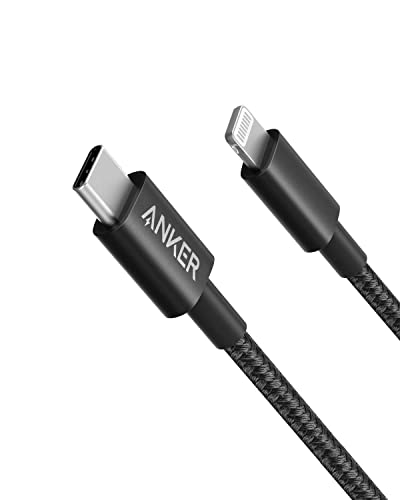
Nomad Goods Kevlar USB-C to Lightning Cable (6ft)
Nomad's Kevlar-reinforced cable is built to last, with a braided aramid fiber exterior that resists cuts and abrasions. It supports USB 2.0 data and 30W charging, but its standout feature is the rugged build that verified owners say survives years of daily car use. The 6ft length is ideal for backseat passengers.
Strengths
- Kevlar braiding makes it nearly indestructible
- 6ft length offers flexibility for any car setup
- 30W charging with MFi certification for iPhone 14 and older
Drawbacks
- USB 2.0 data speed (480Mbps) is slower than USB-C alternatives
- Higher price point due to premium materials
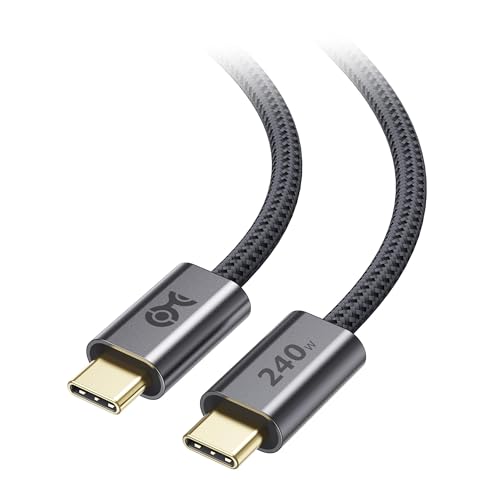
Cable Matters USB-C to USB-C Cable (10ft)
Cable Matters offers a 10ft USB-C cable with USB 3.0 5Gbps data and 100W charging, perfect for cars where the USB port is far from the driver. Verified owners appreciate the thick gauge that maintains signal integrity over long distances, with no CarPlay dropouts reported. The braided nylon adds durability.
Strengths
- 10ft length reaches any car seat without stretching
- 100W charging supports iPhone 15 Pro Max and future devices
- USB 3.0 5Gbps data speed for responsive CarPlay
Drawbacks
- Thick cable is less flexible and harder to store
- May be overkill for short distances
Buying considerations
Data Transfer Speed
For CarPlay, data speed determines how quickly your iPhone communicates with the car's display. USB 2.0 (480Mbps) is sufficient for basic navigation and music, but USB 3.0 (5Gbps) or higher ensures lag-free video streaming and faster map loading. If your car supports high-resolution CarPlay, opt for USB 3.0 or 3.1.
Charging Power
A cable's charging wattage affects how fast your iPhone charges during CarPlay use. iPhones support up to 27W (iPhone 15 Pro Max) via USB-C, so a cable that handles 30W or more is ideal. For future-proofing, consider 100W cables that can also charge laptops.
Cable Length
Measure the distance from your car's USB port to where you mount your phone. A 3ft cable is fine for dashboard mounts, while 6ft or longer is better for center console ports or backseat passengers. Too long a cable can be cumbersome, so choose based on your car's layout.
Durability
Car cables face constant bending, pulling, and temperature changes. Braided nylon or Kevlar jackets resist fraying better than rubber or silicone. Reinforced connector ends prevent breakage at the stress points. Verified reviews often mention durability as a key factor for long-term use.
Final word
For the best CarPlay experience in 2026, prioritize USB 3.0 or higher data speeds and at least 30W charging, with MFi certification non-negotiable. The Anker PowerLine III+ offers the best balance of speed, power, and durability for USB-C iPhones, while Belkin's BoostCharge Pro is the top choice for Lightning users.
Questions answered
Yes, MFi certification ensures the cable meets Apple's standards for data and charging. Non-certified cables may cause CarPlay to disconnect, show an 'Accessory Not Supported' warning, or charge slowly. All picks in this guide are MFi-certified.
Only iPhone 15 and later models have USB-C ports. For iPhone 14 and earlier, you need a USB-C to Lightning cable. Some newer cars have USB-C ports, so you may need an adapter for Lightning iPhones, but a dedicated Lightning cable is more reliable.
Generally, no, as long as the cable is of good quality. Longer cables can introduce slight signal degradation, but with USB 3.0 or higher, 10ft cables work fine. Avoid excessively long cables (over 15ft) as they may cause data errors.
Common causes include a faulty cable, loose connection, or incompatible cable. Ensure your cable is MFi-certified and securely plugged in. Also, check your car's USB port for debris. If the problem persists, try a different cable from this guide.
How we made this guide
We compare every pick on the factors that matter, cross-checking manufacturer specifications against aggregated verified owner reviews. We rank independently and never take payment for placement. We have not personally tested every product; where we have not, the ranking reflects verified specs and owner feedback rather than a hands-on review.
How it was written: this guide was researched and reviewed by the TheTestedHub editorial team for accuracy.
Affiliate disclosure: TheTestedHub is reader-supported. When you buy through links on our site, we may earn a commission at no extra cost to you.
Keep reading

Elgato Alternatives 2026: AVerMedia & Rode Now Lead

Elgato Key Light: Expert Pick for True Color

Top Retro Game Consoles for 2026: A Practical Buyer’s Guide

Console Cooling Stands: Our Best Picks for 2026

The Best Gaming Glasses to Buy in 2026

Gaming Backpacks 2026: Find Yours by Laptop & Gear Needs

2026 Game Storage Racks: Find the Perfect Fit for Your Cases
