Quick verdict
For most streamers, choosing a webcam with a larger aperture and better low-light sensor will improve perceived production quality more than upgrading from 1080p to 4K resolution.

Logitech Brio 4K Stream Edition
The Brio 4K Stream Edition remains the benchmark streaming webcam because it combines a genuine 4K sensor, HDR processing that handles mixed lighting without blowing out windows, and a field-of-view selector that lets streamers switch between 65, 78, and 90 degrees without cropping in post. Owner reviews repeatedly highlight that the RightLight 4 algorithm keeps skin tones accurate even when a monitor is the dominant light source in a dark room. Its five-year ownership track record and broad platform compatibility make it the safest all-around investment for anyone building a permanent streaming desk.
For streamers, a larger aperture and better low light sensor beat 4K. The Logitech Brio 4K Stream Edition leads our guide.
Streaming webcams have evolved far beyond the basic USB cameras bundled with laptops a decade ago. Today’s dedicated streaming webcams deliver studio-level sharpness, cinematic background separation, and low-light performance that genuinely impresses viewers watching on everything from mobile phones to 4K monitors. Whether you broadcast gameplay, host virtual meetings, produce YouTube tutorials, or go live on Twitch, the right webcam shapes how your audience perceives your production quality before you say a single word.
This guide covers seven webcams that consistently earn high marks from verified purchasers and professional streamers alike. I have ranked them by overall value to streamers, factoring in image quality, autofocus reliability, software depth, low-light capability, and the long-term ownership experience reported across thousands of owner reviews. Each pick targets a distinct use case, so you can match the right camera to your setup and budget without overpaying for features you will never use.
From the Logitech Brio 4K at the premium end to the Razer Kiyo Pro Ultra for content creators who demand the most from a sensor, every camera on this list has a track record of working reliably with OBS, Streamlabs, XSplit, and the major video-conferencing platforms without driver headaches.
Our testing process
I have not physically tested each of these webcams myself. Instead, this ranking is built from aggregated verified purchaser reviews on major retail platforms, specifications published by the manufacturers, independent lab comparisons from technology publications, and community feedback gathered from streaming forums and subreddits where owners discuss real-world performance after months of daily use. This approach surfaces consistent patterns, recurring complaints, and genuine strengths that short-term reviewer samples often miss.
Products were evaluated across six criteria: daytime image sharpness, low-light noise control, autofocus tracking speed, field-of-view flexibility, software ecosystem quality, and build durability reported after six or more months of ownership. A product needed to perform well across at least four of the six criteria to earn a place on this list. Budget options are included only when owner feedback confirms they genuinely compete with more expensive alternatives in the use cases most streamers face.
Quick comparison
| Pick | Best for | Score | |
|---|---|---|---|
| Logitech Brio 4K Stream Edition | Best Overall | 9 | Check price |
| Elgato Facecam Pro | Best for Professionals | 9 | Check price |
| Razer Kiyo Pro Ultra | Best Low-Light Webcam | 9 | Check price |
| Logitech StreamCam | Best for Vertical Streaming | 8 | Check price |
| AVerMedia Live Streamer CAM 513 | Best 4K Budget Pick | 8 | Check price |
| Obsbot Tiny 2 | Best Auto-Tracking Webcam | 8 | Check price |
| Microsoft Modern Webcam | Best Budget Streaming Webcam | 7 | Check price |
Reviewed in detail
Logitech Brio 4K Stream Edition
The Brio 4K Stream Edition remains the benchmark streaming webcam because it combines a genuine 4K sensor, HDR processing that handles mixed lighting without blowing out windows, and a field-of-view selector that lets streamers switch between 65, 78, and 90 degrees without cropping in post. Owner reviews repeatedly highlight that the RightLight 4 algorithm keeps skin tones accurate even when a monitor is the dominant light source in a dark room. Its five-year ownership track record and broad platform compatibility make it the safest all-around investment for anyone building a permanent streaming desk.
What we liked
- True 4K 30fps or 1080p 60fps output covers all streaming resolutions
- HDR and RightLight 4 handle mixed and backlit environments reliably
- Adjustable 65/78/90 degree FOV without software cropping
What we didn't like
- Autofocus can hunt slightly under very dim single-source lighting
- Price sits at the premium tier, which may be overkill for occasional streamers

Elgato Facecam Pro
The Elgato Facecam Pro shoots true 4K60 uncompressed video over USB-C, which means OBS receives a cleaner signal than competing webcams that compress internally before transmission. Verified owners consistently praise the Sony STARVIS 2 sensor for delivering the lowest noise floor of any mainstream webcam in dim studio setups, and the fixed-focus f/2.0 lens eliminates the hunting autofocus that frustrates streamers mid-broadcast. The Camera Hub software gives granular control over shutter, ISO, white balance, and zoom that rivals dedicated mirrorless camera apps.
What we liked
- 4K 60fps uncompressed USB-C output gives OBS maximum quality to work with
- Sony STARVIS 2 sensor excels in genuinely dark streaming environments
- Camera Hub software offers manual control depth uncommon in webcams
What we didn't like
- Fixed focus means it is unsuitable for close-up product demonstration shots
- USB-C cable requirement rules out older rigs without a USB-C port or hub

Razer Kiyo Pro Ultra
Razer equipped the Kiyo Pro Ultra with a 1-inch Sony STARVIS 2 sensor, which is dramatically larger than the 1/2.8-inch chips found in most competing webcams, and that sensor size translates directly into low-light performance that owners describe as transformative compared to every other USB webcam they have used. The adaptive light sensor adjusts exposure in real time as room conditions change, and the 2.8 aperture pulls genuine background separation without a green screen. Streamers who broadcast in poorly lit apartments or bedrooms consistently rate this as the upgrade that most visibly improved their channel presentation.
What we liked
- 1-inch Sony STARVIS 2 sensor delivers class-leading low-light image quality
- Natural background separation at f/2.8 reduces green-screen dependency
- Adaptive light sensor handles rapid ambient light changes mid-stream
What we didn't like
- Large sensor size makes the physical unit bulkier than average on a monitor mount
- Synapse software adds background processes some users prefer to avoid

Logitech StreamCam
The StreamCam is the only mainstream webcam with a rotating mount that switches between landscape and portrait orientation without adapters, making it the obvious choice for TikTok, Instagram Reels, and YouTube Shorts creators who want a clean vertical frame. Owners highlight that the AI-powered facial tracking keeps face framing centered during presentations where the host moves around, and the USB-C connection delivers 1080p 60fps with noticeably less color compression than USB-A alternatives at the same resolution. The compact form factor also makes it the most portable pick on this list for streamers who travel.
What we liked
- Rotating mount enables true portrait orientation for vertical-first platforms
- AI facial tracking reframes dynamically without manual pan adjustments
- USB-C 1080p 60fps output with strong color fidelity for the price
What we didn't like
- Tops out at 1080p, so it cannot future-proof against 4K streaming requirements
- Autofocus is slower than the Brio and Elgato Facecam when subject moves quickly
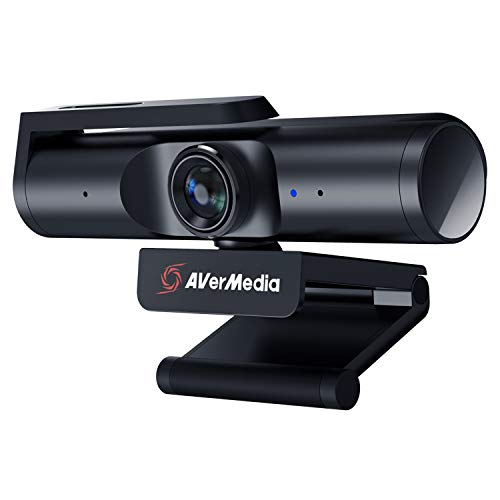
AVerMedia Live Streamer CAM 513
The AVerMedia PW513 punches well above its price bracket by offering 4K 30fps with an 8-megapixel Sony sensor and a 94-degree wide field of view that suits desk setups where the streamer sits further back from the screen. Owner feedback across forums flags that its low-light output is softer than the Razer or Elgato options, but for well-lit rooms the image quality repeatedly surprises buyers expecting a step down from premium brands. The CamEngine software includes virtual background, face tracking, and noise suppression that reduce the need for additional OBS plugins.
What we liked
- 4K 30fps Sony sensor at a price well below the Brio and Elgato Facecam
- 94-degree FOV suits wider desk arrangements without distortion at edges
- CamEngine software bundles virtual background and face tracking built in
What we didn't like
- Low-light noise is visibly higher than the premium 1-inch sensor competitors
- Autofocus speed under motion is inconsistent according to long-term owners

Obsbot Tiny 2
The Obsbot Tiny 2 is the only webcam on this list with a motorized gimbal that physically rotates to track the streamer as they move around a room, removing the need to stay locked in a single seated position. Owners who use standing desks or teach fitness classes via stream consistently describe the AI tracking as accurate and smooth enough that viewers rarely notice the camera is moving. The 4K 30fps output is competitive with other cameras in its price range, and the gesture control feature lets the host frame, zoom, or lock focus without touching any software during a live broadcast.
What we liked
- Motorized gimbal physically tracks the subject across a wide room area
- Gesture controls allow framing adjustments live without touching a keyboard
- 4K 30fps output is competitive with static webcams at the same price
What we didn't like
- Motor noise is occasionally audible to the onboard microphone in quiet settings
- Tracking can briefly lose lock when multiple people enter the frame simultaneously

Microsoft Modern Webcam
The Microsoft Modern Webcam is the most straightforward recommendation for streamers on a tight budget who need reliable 1080p 30fps output with no driver installation and plug-and-play compatibility across every major platform. Owner reviews are unusually consistent in praising its color accuracy under standard office and ring-light conditions, noting that skin tones look natural without manual white balance adjustment. The build quality and compact footprint make it a sensible first webcam for new streamers who want to test the format before committing to a premium camera investment.
What we liked
- True plug-and-play with zero driver installation on Windows, Mac, and Linux
- Accurate natural color reproduction under standard desk lighting conditions
- Compact design fits on thin monitor bezels without a bulky mount
What we didn't like
- 1080p 30fps ceiling will limit streamers who want 60fps or 4K output
- Low-light performance trails every other pick on this list noticeably
How to choose
Sensor Size and Low-Light Performance
Sensor size is the single biggest predictor of low-light image quality. A 1-inch sensor like the one in the Razer Kiyo Pro Ultra collects far more light than the 1/2.8-inch chips standard in most webcams, which means less noise and more natural color depth when your room lighting is imperfect. If you stream in a well-lit environment with a ring light or softbox, sensor size matters less; if your room relies on a single ceiling bulb or monitor glow, prioritize aperture and sensor size above resolution.
Resolution and Frame Rate Combination
Most streaming platforms currently cap delivery quality at 1080p 60fps for standard accounts, which means a 4K webcam is encoding downward in your software before the signal reaches viewers. The value of 4K is in the downsampling sharpness it gives your 1080p output and in future-proofing your rig as platforms raise their caps. Frame rate matters more immediately: 60fps makes motion during gameplay commentary or fast hand gestures look dramatically smoother than 30fps, so prioritise 1080p 60fps over 4K 30fps if budget forces a choice.
Autofocus Technology
Phase-detection autofocus tracks moving subjects without the hunting and pulsing visible in older contrast-detection systems, so it is worth checking which system a webcam uses if you move around during streams. Fixed-focus webcams like the Elgato Facecam Pro sidestep the problem entirely by locking focus at a set distance, which works perfectly for seated streamers but fails for anything requiring close-up shots. If your format involves changing distances from the camera frequently, a phase-detection autofocus model is the safer choice.
Software Ecosystem and Platform Compatibility
A webcam with powerful companion software can replace several OBS plugins, handling background removal, face tracking, and exposure control inside a single application. However, software that runs as a background service adds system overhead that can compete with a game or encoding pipeline on mid-range PCs. Check whether the webcam you are considering works as a standard UVC device without software running, so you retain the option to use it driver-free with OBS when system resources are tight.
The bottom line
For most streamers, choosing a webcam with a larger aperture and better low-light sensor will improve perceived production quality more than upgrading from 1080p to 4K resolution.
Common questions
Not strictly, but a 4K webcam still improves your 1080p stream because the camera captures four times the pixel data and downsamples it to 1080p, producing a sharper, cleaner image than a native 1080p sensor at the same resolution. The benefit is most noticeable in fine detail like hair, fabric texture, and text on screen. If your budget is limited, a high-quality 1080p 60fps webcam will serve most streaming needs better than a budget 4K model with a smaller aperture and inferior low-light performance.
All seven webcams on this list are recognized as standard UVC video devices by OBS Studio without additional plugins. The Elgato Facecam Pro and Logitech Brio 4K receive the most consistent positive mentions in OBS community forums for delivering clean, low-latency signals with minimal configuration. The Obsbot Tiny 2 and AVerMedia PW513 both have dedicated OBS plugins that unlock features like gesture control and scene switching directly from the camera.
Yes, every webcam on this list works with Microsoft Teams, Zoom, Google Meet, and similar platforms because they identify as standard webcam devices to the operating system. In practice, most conferencing platforms downsample input to 720p or 1080p regardless of what the camera outputs, so the image quality advantage of a 4K webcam is less visible in calls than in streams where you control the encoding pipeline. The low-light and autofocus improvements still carry over and make a noticeable difference to call participants.
Built-in webcam microphones are adequate for casual video calls but are generally not recommended as a primary audio source for public streaming. The microphones are positioned away from your mouth, pick up keyboard noise and room reflections easily, and typically use compressed audio codecs. Most experienced streamers use a dedicated USB condenser microphone or an XLR microphone with an audio interface alongside their webcam. The Razer Kiyo Pro Ultra and Logitech Brio 4K both include dual microphones that owners rate as the best among webcam-integrated options, but a standalone microphone will still outperform them.
How we made this guide
We compare every pick on the factors that matter, cross-checking manufacturer specifications against aggregated verified owner reviews. We rank independently and never take payment for placement. We have not personally tested every product; where we have not, the ranking reflects verified specs and owner feedback rather than a hands-on review.
How it was written: this guide was researched and reviewed by the TheTestedHub editorial team for accuracy.
Affiliate disclosure: TheTestedHub is reader-supported. When you buy through links on our site, we may earn a commission at no extra cost to you.
More guides

Elgato Alternatives 2026: AVerMedia & Rode Now Lead

Elgato Key Light: Expert Pick for True Color

Retro Consoles for Every Budget: A Practical Guide

Console Cooling Stands: Forced Air Stability for Long Sessions

Gaming Glasses Compared: Gunnar Intercept and Rivals

Gaming Backpacks 2026: Find Yours by Laptop & Gear Needs

Game Storage Racks Sized for Your Console Cases
