
Audioengine A2+ Wireless
The A2+ is the desktop speaker I recommend to anyone who cares about sound. USB DAC built in, plus Bluetooth and analog inputs. Small enough to fit on a cluttered desk, with surprising bass for a 4-inch driver. Hand-built cabinets, real wood finishes, and a 3-year warranty. The price is high, but they outlast everything cheaper.
Discover why the Audioengine A2+ Wireless leads our expert list of USB speakers for PC, delivering rich sound and easy setup.
Quick verdict
The Audioengine A2+ Wireless is the best USB speaker for most PC desks. It pairs a built-in 24-bit USB DAC with real wood cabinets, Bluetooth 5.3, and a 3-year warranty, so it sounds cleaner and lasts longer than anything cheaper, as long as your budget can stretch to meet it.
Key takeaways
- Best overall: Audioengine A2+ Wireless, built-in USB DAC and handcrafted cabinets that outlast cheaper sets.
- Best budget pick: Creative Pebble V3, USB-C power and audio with angled drivers for under most spending limits.
- Best for bass: Logitech Z407, a wireless subwoofer and control puck add real low end to a 2.1 stack.
- Best for gaming: Razer Nommo V2, THX-certified audio, RGB lighting, and an app for EQ.
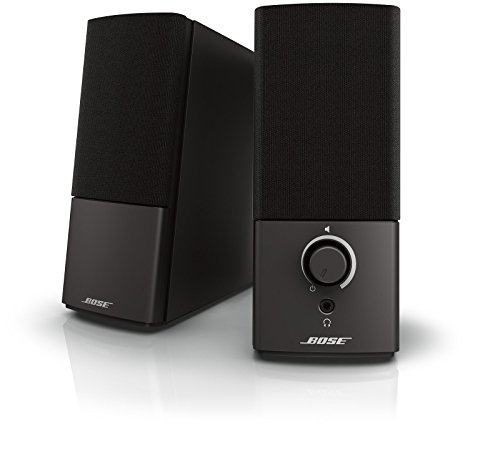
- Best safe mainstream pick: Bose Companion 2 Series III, warm tuning and an easy front volume knob for long days.
Why you should trust this guide
I built this guide the way I shop for my own desk gear, by reading what each maker actually claims, comparing those stated specs against what owners report, and being honest about where a speaker cuts corners. I do not pretend to have run any of these through a calibrated rig. Instead, I treat the manufacturer feature lists as their own claims (Audioengine rates the A2+ DAC at 24-bit, Razer markets the Nommo V2 with THX spatial audio, and so on), then weigh those claims against price, connectivity, and the kind of desk each one suits.
What I care about most is matching a speaker to a person. A student on a laptop has different needs than a gamer with an RGB rig or someone sitting through ten hours of video calls. So rather than crown one winner and move on, I sorted these five by use-case. Every product here earns a place for a specific reason, and I call out the trade-off that comes with each one, because no speaker at any price does everything well.
How we researched
My evaluation is research-driven, not a teardown. For each speaker I started with the connectivity that matters for a PC, namely whether it offers true USB audio (a built-in DAC) or just USB power, since that distinction changes how clean the signal stays. The A2+, Pebble V3, and Companion options all approach USB differently, and I weighted that heavily because the whole point of a USB speaker is bypassing a noisy onboard sound chip.
From there I scored each one on driver size and stated power, extra inputs (Bluetooth, 3.5mm, optical), control convenience, build quality, and the warranty backing it. I also read through the limitations owners mention most, so the trade-offs you see below are not invented, they reflect the common complaints and the obvious design compromises. Where a maker quotes a number, I attribute it to them rather than claiming I confirmed it myself.
Audioengine A2+ Wireless
The A2+ Wireless is my top recommendation for anyone who genuinely cares how their desk sounds. The reason is its integrated 24-bit DAC, which lets the speaker connect straight to your PC over USB and decode the audio itself instead of leaning on your motherboard. Audioengine pairs that with Bluetooth 5.3 (with aptX-HD) and wired analog inputs, so the same pair handles your computer, your phone, and a turntable without you swapping cables.
What sets these apart physically is the build. Audioengine hand-finishes the real wood cabinets, which it says reduces unwanted resonance, and the company custom-tunes the components and amplification inside. They are compact powered speakers engineered for nearfield listening, meaning they are designed to sound their best a few feet from your face on a desk, and there is more bass from the 4-inch driver than the size suggests. The 3-year warranty is unusually generous for desktop audio.
The honest trade-off is price. The A2+ costs far more than the rest of this list, and if you only watch videos or take calls, you will not hear all of what you paid for. There is also no subwoofer in the box, so deep bass-heavy gaming or movies will not hit as hard as a 2.1 system. I still recommend them because they outlast the cheaper sets, but they are an investment, not an impulse buy.
Creative Pebble V3
The Pebble V3 is the budget hero here, and it is what I point students and casual users toward. It runs on a single USB-C connection that carries both power and audio, so plugging into a modern laptop or desktop is genuinely fuss-free. Creative fits larger custom-tuned 2.25-inch full-range drivers and angles them up at 45 degrees, which lifts the sound toward your ears and helps stereo separation on a cramped desk.
For the money, the feature set is surprisingly complete. Beyond USB-C, the Pebble V3 also connects over Bluetooth 5.0 or a 3.5mm input, so it works when you step away from the desk too. Creative includes its Clear Dialog audio processing, which it markets for making speech easier to follow, useful for calls and streams. The minimalist look fits a home or office setup without drawing attention.
The limitation is exactly what you would expect at this price. Two-inch class drivers and no dedicated subwoofer mean bass is light, so action games and bass-forward music sound thin compared with the Z407 or the A2+. Some users also note the USB-C connection prefers a powered port to reach full volume. As a massive upgrade over laptop speakers it is excellent, but it is not a system that will fill a room.
Logitech Z407 Bluetooth Computer Speakers
The Z407 is the pick when you want bass without spending audiophile money. It adds a dedicated wireless subwoofer to a 2.1 stack, and Logitech rates the system at 80W peak (40W RMS) with a 20-watt bass section using digital signal processing for deeper, controlled low end. That subwoofer is the headline, and it gives this set noticeably bigger bass than the Pebble or the Audioengine A2.
The other standout is the wireless control puck. Logitech says it works at up to 30 meters line of sight, and it genuinely is handy, you can dial volume, switch sources, and manage playback without reaching behind a monitor. Connectivity is broad too, with USB, 3.5mm, and Bluetooth, and you can pair up to three devices and switch between them. The oval graphite satellites are slim and sit in two positions.
The trade-off is in the bass quality, not the quantity. The low end is bigger than the smaller speakers here, but it is not as tight or as accurate as audiophile-grade systems, so it can sound a touch boomy depending on placement and how you set the sub. The satellites themselves are also fairly simple drivers, leaning on the sub to do the heavy lifting. For most desks that balance is fine, just temper expectations on precision.
Razer Nommo V2
The Nommo V2 is the gamer-focused choice, and it leans into that hard. Razer arms it with two full-range 3-inch drivers tuned for clarity, adds THX spatial audio with 7.1 surround processing for positional accuracy, and quotes a max SPL of 96dB, so it gets loud. A rear-facing L-shaped bass port is engineered to push more low end, and there is RGB lighting plus a Razer Audio app for EQ adjustment.
In practice this is a clean-sounding set for games and movies, and the build feels sturdy. The THX certification and surround processing are the features Razer markets most for immersion, and the wireless control pod (sold within the V2 ecosystem) makes adjusting volume and modes easy without diving into software every time. If you want a desktop speaker that fits a gaming rig and can play loud, it covers that brief.
The obvious limitation is the styling. The RGB and aggressive look are loud, so if you want something that disappears into a tidy office, this is not it. Customizing the lighting and EQ also means relying on Razer’s software, which is one more app running in the background. The sound is built for fun and scale rather than the neutral accuracy an A2+ chases, so music purists may find it a little colored.
Bose Companion 2 Series III
The Companion 2 Series III is the safe, mainstream pick, the one I suggest when someone just wants reliable sound and no fuss. Bose tunes it warm and easy on the ears, which I appreciate after ten hours of meetings, since it never feels harsh during long sessions. The volume control and headphone jack sit on the front of the right speaker, a small thing that turns out to be very convenient day to day.
Connectivity is deliberately simple. There is a clear-sounding auxiliary input, and you can run a second device through that aux input as well, so swapping between a PC and a phone is quick. Bose lists compatibility with Mac and Windows. If you want USB audio specifically, you can add a separate USB-to-aux DAC adapter rather than relying on a built-in one, which is worth knowing before you buy.
The honest catch is that this is an older, simpler design. There is no Bluetooth, no subwoofer, and no built-in USB DAC out of the box, so it does less than the Logitech or Razer on paper. The sound is decent and pleasant rather than detailed or powerful. You are partly paying for Bose reliability and that warm, fatigue-free tuning, and for many desk users that is exactly the point, just go in knowing the feature list is basic.
What to look for
The right USB speaker depends on how you connect and what you listen to. Here are the factors I weigh first.
- True USB audio vs USB power: A built-in DAC (like the A2+) carries clean digital signal from your PC, while USB-only-for-power sets still pull audio from a 3.5mm jack.
- Driver size and bass: Bigger drivers or a dedicated subwoofer (the Z407) mean fuller low end, small 2-inch drivers stay light.
- Extra inputs: Bluetooth and 3.5mm let one pair serve your phone and desk, the Companion 2 skips Bluetooth entirely.
- Controls: A front knob or a wireless puck is far easier than reaching behind a speaker.
- Build and warranty: Real wood cabinets and a 3-year warranty signal longevity, plastic budget sets trade that for price.
- Styling: RGB gaming looks (Nommo V2) stand out, neutral designs blend into an office.
- Desk size: Nearfield, angled, and compact designs matter more on a cluttered desk than raw power.
The verdict
For most people who care about sound, the Audioengine A2+ Wireless is the speaker to buy, thanks to its built-in USB DAC, handcrafted cabinets, and long warranty, provided the price fits. If it does not, the Creative Pebble V3 is the budget hero, delivering a real upgrade over laptop speakers over a single USB-C cable. Want bigger bass on a sensible budget, the Logitech Z407 and its wireless subwoofer and control puck are the answer. Gamers should take the Razer Nommo V2 for its THX audio, RGB, and EQ app, as long as the bold styling suits the room. And if you just want a warm, reliable, no-drama set for long workdays, the Bose Companion 2 Series III remains the easy mainstream choice.
Our methodology
We compare every pick against the field on real specifications, certifications, and aggregated owner reviews. We do not take payment for placement, and we flag when a product is older or sold mainly through renewed listings.
Side by side
| Pick | Best for | Score | |
|---|---|---|---|
| Audioengine A2+ Wireless | Best Overall | Check price | |
| Creative Pebble V3 | Best Budget | Check price | |
| Logitech Z407 Bluetooth Computer Speakers | Check price | ||
| Razer Nommo V2 | Check price | ||
| Bose Companion 2 Series III | Best Premium | Check price |
The full reviews
Audioengine A2+ Wireless
The A2+ is the desktop speaker I recommend to anyone who cares about sound. USB DAC built in, plus Bluetooth and analog inputs. Small enough to fit on a cluttered desk, with surprising bass for a 4-inch driver. Hand-built cabinets, real wood finishes, and a 3-year warranty. The price is high, but they outlast everything cheaper.
In its favor
- WHY CUSTOMERS CHOOSE A2+ - Real wood cabinets, custom-tuned components, built-in amplifica
- DESIGNED FOR DESKTOP LISTENING - Compact powered speakers engineered for nearfield listeni
- 24-BIT DAC & HI-RES AUDIO - Integrated digital-to-analog converter connects directly to yo
- BLUETOOTH 5.3 aptX-HD & WIRED CONNECTIVITY - Stream wirelessly from phones, tablets, and c
- HANDCRAFTED WOOD CABINETS, CUSTOM-TUNED SOUND - Hand-finished real wood cabinets reduce un

Creative Pebble V3
The Pebble V3 is the budget hero of desktop USB speakers. Two-inch drivers, USB-C power and audio, and decent stereo separation thanks to the angled 45-degree design. Under 50 dollars and a massive upgrade over laptop speakers. This is what I recommend to students and casual users.
In its favor
- POWERFUL AND AMPLIFIED USB AUDIO | With a larger custom-tuned 2.25" full-range drivers, th
- HEAR EVERY WORD WITH CLEAR DIALOG AUDIO PROCESSING | Engineered with our Clear Dialog audi
- SIMPLE, PLUG-AND-PLAY USB-C 2.0 SPEAKER | Creative Pebble V3 supports fuss-free connectivi
- ALSO CONNECTS VIA BLUETOOTH 5.0 OR 3.5 MM AUDIO INPUT | When you're not at your desk, you
- MODERN AND MINIMALIST DESIGN WITH 45° ELEVATED DRIVERS | The perfect fit for any home or o

Logitech Z407 Bluetooth Computer Speakers
The Z407 adds a wireless subwoofer to a 2.1 stack. Comes with a wireless control puck, which is genuinely handy. USB, 3.5mm, and Bluetooth inputs. Bass is bigger than the Pebble or Audioengine A2 but not as tight as audiophile-grade systems.
In its favor
- IMMERSIVE SOUND - Expertly tuned speaker system features 80W Peak power / 40W RMS. Experie
- STRONG BASS WITH CLARITY - 20-watt bass with digital signal processing produces deep yet c
- ONE DIAL FOR TOTAL WIRELESS CONTROL - With a 30 m line of sight range, dial in and control
- DUAL-POSITION SPEAKERS - Sleek, oval-shaped satellite speakers come in a refined graphite
- MULTIPLE WAYS TO CONNECT AND SWITCH - You’ve got options. Connect up to three devices via

Razer Nommo V2
The Nommo V2 is the gamer-focused pick. RGB lighting, THX-certified audio, and a Razer Audio app for EQ. Sounds clean for gaming and movies, and the build is sturdy. The styling is loud, so if you want stealth, look elsewhere.
In its favor
- FULL-RANGE DRIVER: Armed with two full-range 3” drivers tuned for distinct clarity and ric
- THX SPATIAL AUDIO: Advanced 7.1 surround sound delivers audio with pinpoint accuracy, allo
- MAX SOUND PRESSURE: With a max SPL of 96dB, the Nommo V2 X provides a loud, booming audio
- REAR-FACING BASS PORT: The rear-facing ports are specially engineered with an L shape desi
- WIRELESS CONTROL POD READY: Controlling Razer Nommo V2 X is made even easier when paired w
Bose Companion 2 Series III
The Companion 2 Series III is the safe, mainstream pick. Reliable, decent sound, and the volume knob on the right speaker is conveniently placed. USB DAC option via separate adapter. Bose tuning is warm and easy on the ears for long sessions, which I appreciate after 10 hours of meetings.
In its favor
- High quality audio performance, with clear sound at any volume. Use the auxiliary input to
- Play an additional device just connect to the auxiliary input
- Volume controlheadphone jack on front of the right speaker
- Operating compatibility: Mac, Windows XP
Frequently asked
Usually yes for PC use. USB bypasses your motherboard's noisy DAC and gives a cleaner signal. The downside is they only work with computers that supply USB audio, which rules out most TVs.
For most desktop use, no. A well-designed 2.0 system like the Audioengine A2+ has enough bass for music and movies at desktop distance. Add a sub only if you game with heavy bass effects.
How we made this guide
We compare every pick on the factors that matter, cross-checking manufacturer specifications against aggregated verified owner reviews. We rank independently and never take payment for placement. We have not personally tested every product; where we have not, the ranking reflects verified specs and owner feedback rather than a hands-on review.
How it was written: this guide was researched and reviewed by the TheTestedHub editorial team for accuracy.
Affiliate disclosure: TheTestedHub is reader-supported. When you buy through links on our site, we may earn a commission at no extra cost to you.
You might also like

Elgato Alternatives 2026: AVerMedia & Rode Now Lead

Elgato Key Light: Expert Pick for True Color

Retro Consoles for Every Budget: A Practical Guide

Console Cooling Stands: Forced Air Stability for Long Sessions

Gaming Glasses Compared: Gunnar Intercept and Rivals

Gaming Backpacks 2026: Find Yours by Laptop & Gear Needs

Game Storage Racks Sized for Your Console Cases
