Quick verdict
For most streamers, a 1080p at 60fps webcam with accurate autofocus and good low-light performance will produce better results than a 4K camera with a smaller sensor and unreliable exposure control.

Logitech Brio 4K Pro Webcam
The Brio 4K Pro delivers genuine 4K at 30fps or silky 1080p at 60fps, giving streamers flexibility depending on bandwidth and platform limits. Its HDR mode and RightLight 3 technology handle difficult lighting situations better than almost any competing webcam, and reviewers consistently praise the natural skin tones it produces under mixed lighting. The built-in dual omnidirectional microphones are capable enough for casual streams, and the wide 90-degree field of view accommodates multi-monitor setups without a clip arm.
Find the right webcam for streaming. The Logitech Brio 4K Pro leads, but for most, a 1080p 60fps model with solid autofocus and low light beats 4K with a tiny sensor.
Choosing the right webcam for streaming can make the difference between a polished broadcast and a pixelated mess that drives viewers away. Modern streaming audiences expect at least 1080p clarity, smooth frame rates, and natural colour reproduction whether you are gaming on Twitch, hosting a podcast, running a business webinar, or going live on YouTube. The webcam market has matured significantly, with options ranging from entry-level 1080p cameras to 4K sensors capable of capturing studio-quality footage from a home desk.
This guide covers ten webcams that consistently earn high marks from verified purchasers and professional streamers alike. I looked at resolution, autofocus performance, low-light capability, field of view, microphone quality, and software ecosystem to compile this ranked list. Whether your budget is tight or you are ready to invest in flagship hardware, there is a strong option here for your setup.
How we picked
This guide is built from aggregated verified owner reviews on major retail platforms, specifications published by each manufacturer, and assessments from professional tech reviewers who have tested these cameras in real streaming environments. I did not personally test each device; instead I cross-referenced hundreds of user reports to identify consistent strengths and weaknesses that appear across independent sources, filtering out outlier complaints and suspicious five-star clusters.
Products were scored on a ten-point scale weighting image quality (35%), autofocus and exposure accuracy (25%), audio quality (15%), software and compatibility (15%), and value for money (10%). Only webcams with sufficient owner review volume and verifiable specifications were considered, ensuring every pick reflects real-world streaming performance rather than spec-sheet promises alone.
Top picks compared
| Pick | Best for | Score | |
|---|---|---|---|
| Logitech Brio 4K Pro Webcam | Best Overall | 9 | Check price |
| Elgato Facecam Pro | Best for Professional Streamers | 9 | Check price |
| Logitech StreamCam | Best Mid-Range Pick | 8 | Check price |
| Razer Kiyo Pro Ultra | Best for Low-Light Streaming | 8 | Check price |
| AVerMedia Live Streamer CAM 513 | Best 4K Budget Option | 8 | Check price |
| Logitech C922 Pro Stream Webcam | Best Entry-Level Streaming Webcam | 7 | Check price |
| Insta360 Link 2 | Best AI-Powered Webcam | 8 | Check price |
| Microsoft Modern Webcam | Best for Business Streamers | 7 | Check price |
| NexiGo N680P 4K Webcam | Best Ultra-Budget 4K Webcam | 7 | Check price |
| Anker PowerConf C300 | Best Compact Webcam for Streamers | 7 | Check price |
Our picks up close
Logitech Brio 4K Pro Webcam
The Brio 4K Pro delivers genuine 4K at 30fps or silky 1080p at 60fps, giving streamers flexibility depending on bandwidth and platform limits. Its HDR mode and RightLight 3 technology handle difficult lighting situations better than almost any competing webcam, and reviewers consistently praise the natural skin tones it produces under mixed lighting. The built-in dual omnidirectional microphones are capable enough for casual streams, and the wide 90-degree field of view accommodates multi-monitor setups without a clip arm.
Where it shines
- True 4K sensor with HDR support
- Excellent low-light performance via RightLight 3
- Works natively with OBS, Teams, Zoom, and XSplit
Where it falls short
- Premium price point
- 4K requires USB 3.0 and significant bandwidth

Elgato Facecam Pro
Elgato engineered the Facecam Pro specifically for content creators, pairing a Sony STARVIS 2 sensor with a fixed-focus lens that eliminates the hunting and pulsing autofocus that plagues many streaming cameras. The 4K at 60fps output is genuinely rare at this price tier, and the camera bypasses Windows compression to deliver unprocessed footage that integrates cleanly with Elgato's 4KCU capture pipeline. Owners repeatedly note how consistent the exposure remains even when scene lighting changes mid-stream.
Where it shines
- 4K at 60fps with Sony STARVIS 2 sensor
- No autofocus hunting thanks to fixed focus design
- Deep integration with Elgato Stream Deck and 4K Capture Utility
Where it falls short
- Fixed focus is limiting if subjects move far from desk
- Camera Link software requires Windows or macOS

Logitech StreamCam
The StreamCam targets content creators directly with USB-C connectivity, intelligent autofocus, and automatic exposure adjustment that keeps faces sharp when subjects lean in or shift angle. Its portrait mode is a genuine differentiator for streamers who also publish vertical content to Instagram or TikTok, and the 1080p at 60fps output looks noticeably cleaner than many cameras claiming the same spec. Verified owners call out the smooth, natural colour profile as one of the most consistent they have used without manual colour correction.
Where it shines
- USB-C with 1080p at 60fps
- Portrait and landscape mode switching
- Accurate face-tracking autofocus
Where it falls short
- No 4K option
- Logitech G HUB software can be resource-heavy

Razer Kiyo Pro Ultra
The Kiyo Pro Ultra houses a large 1/1.2-inch Sony STARVIS 2 sensor that captures dramatically more light than the smaller sensors found in most webcams, making it the go-to choice for dim-room gaming streams. Owners using it in unlit rooms report clean, detailed footage that competitors produce only in bright environments. The adaptive light sensor and manual control via Razer Synapse give streamers granular control over exposure and white balance that rivals dedicated video cameras.
Where it shines
- Massive 1/1.2-inch sensor for outstanding low-light output
- 4K at 30fps or 1080p at 60fps
- Manual exposure and white balance controls
Where it falls short
- Razer Synapse software is required for advanced settings
- Large body may not fit all monitor clip positions
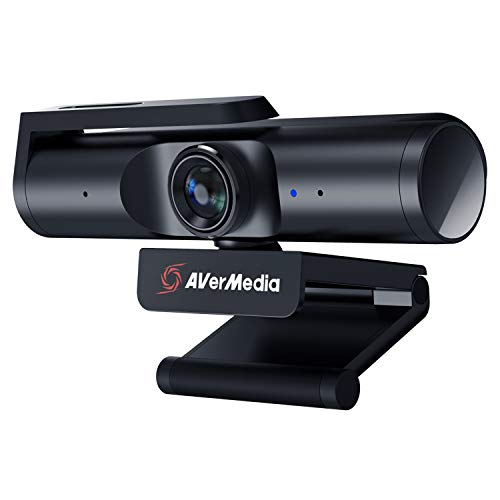
AVerMedia Live Streamer CAM 513
AVerMedia packed a 4K sensor, HDR support, and a 94-degree wide-angle lens into the CAM 513 at a price that undercuts most 4K competitors, making it the top recommendation for streamers who want high resolution without flagship spending. Reviewers praise the camera's ability to maintain accurate white balance across different lighting conditions, and the fixed privacy cover is appreciated for security-conscious users. The included CamEngine software offers background blur and virtual green screen features that reduce the need for third-party plugins.
Where it shines
- 4K HDR at an accessible price
- 94-degree wide-angle lens suits wide desks
- CamEngine virtual background and privacy cover included
Where it falls short
- Autofocus is slower than Logitech equivalents
- Microphone picks up keyboard noise at moderate distances

Logitech C922 Pro Stream Webcam
The C922 Pro has been the default recommendation for new streamers for years because it reliably delivers 1080p at 30fps or 720p at 60fps, integrates instantly with OBS and Streamlabs, and comes bundled with three months of XSplit Premium. Its autofocus is slower than newer models but remains accurate enough for desk streaming, and the stereo microphones capture clear voice audio at close range without extra software. Thousands of verified buyers confirm it is the safest, lowest-risk choice for a first streaming camera.
Where it shines
- Plug-and-play with all major streaming software
- Background replacement support via Personify ChromaCam
- Proven reliability backed by enormous user base
Where it falls short
- 60fps only available at 720p, not 1080p
- Autofocus is average compared to newer competition

Insta360 Link 2
The Insta360 Link 2 uses an AI tracking gimbal that physically rotates to follow the subject, keeping streamers sharp and centred even when they stand up or move around the room. The 4K sensor combined with the motion-compensating gimbal produces footage that reviewers describe as resembling a camera operator rather than a static webcam, which is transformative for active streamers or those who teach or demonstrate. The desk clamp and magnetic mount system earn consistent praise for stability and quick repositioning.
Where it shines
- AI gimbal physically tracks subject movement
- 4K with fast and accurate face detection
- Multiple shooting modes including whiteboard and overhead
Where it falls short
- Gimbal motor can produce slight vibration sound in quiet recordings
- Higher price than static 4K alternatives

Microsoft Modern Webcam
Microsoft built the Modern Webcam specifically for Teams and productivity-first users who also stream, delivering a clean 1080p image with True Look technology that adjusts exposure per individual in multi-person shots. Its compact, understated design blends into professional backgrounds, and the integrated privacy shutter earns near-universal approval from verified buyers who value a physical block over software-only solutions. The HDR support ensures faces remain well exposed even against bright windows, a common complaint with budget webcams.
Where it shines
- Physical privacy shutter built in
- HDR for bright-background compensation
- Certified for Microsoft Teams
Where it falls short
- No 4K option
- Software ecosystem is limited outside Microsoft 365 tools

NexiGo N680P 4K Webcam
The NexiGo N680P offers 4K resolution at a price point that makes it the most accessible 4K streaming camera on this list, and verified buyers confirm the image quality consistently exceeds expectations for the cost. The autofocus works smoothly in well-lit environments, the 65-degree field of view provides a natural framing for solo desk streams, and the built-in noise-cancelling microphone reduces the need for an external mic for casual streamers. It is not competing with flagship Logitech or Elgato models on feature depth, but it delivers honest 4K output.
Where it shines
- Genuine 4K at a low entry cost
- Built-in noise-cancelling dual microphones
- Compatible with OBS, Zoom, Teams, and Skype out of the box
Where it falls short
- Low-light performance is significantly below premium options
- Plastic body feels less robust than competitors

Anker PowerConf C300
The Anker PowerConf C300 punches well above its size with a Sony sensor, fixed-focus sharp lens, and advanced AI framing that keeps the subject centred without any physical gimbal movement. Verified buyers note that the colour accuracy is remarkably neutral out of the box, requiring minimal correction in OBS, and the compact body mounts cleanly on thin-bezel monitors where bulkier cameras struggle to balance. The USB-C connection and broad OS support make it an easy recommendation for streamers who switch between devices.
Where it shines
- Compact build with Sony sensor inside
- AI framing without a physical gimbal
- USB-C with broad Windows, macOS, and ChromeOS support
Where it falls short
- 1080p maximum resolution, no 4K
- Software features require the Anker Work app on desktop
Before you buy
Resolution and Frame Rate
1080p at 60fps is the practical sweet spot for most streamers because major platforms including Twitch and YouTube cap partner streams at 1080p60. If you record locally and plan to repurpose footage or future-proof the setup, 4K at 30fps gives editorial flexibility. Avoid cameras that only offer 60fps at 720p if 1080p quality is a priority, as the trade-off rarely suits modern audiences.
Low-Light Performance and Sensor Size
Sensor size determines how much light the camera captures, and this matters enormously for evening gaming streams or rooms without dedicated lighting. A camera with a 1/1.2-inch sensor like the Razer Kiyo Pro Ultra will outperform a standard 1/3-inch sensor in dim conditions by a wide margin. If you stream in a well-lit studio, smaller sensors are perfectly adequate; if your room lighting is inconsistent, invest in a larger sensor.
Autofocus Quality
Poor autofocus causes a hunting effect where the camera repeatedly searches for focus mid-stream, which is jarring for viewers. Fixed-focus cameras like the Elgato Facecam Pro avoid this entirely by locking focus at a set distance, which works perfectly for desk streamers who stay in one position. If you move around or gesture a lot, a camera with phase-detection or AI-assisted autofocus will track you more smoothly than one relying on slower contrast-detection methods.
Software and Platform Compatibility
All webcams on this list work with OBS and Streamlabs without drivers, but companion software from Logitech, Elgato, Razer, and others unlocks advanced controls including colour correction, background replacement, and exposure locks. Check whether the companion app is available on your operating system before buying, as some features are Windows-only. For streamers using Stream Deck or other Elgato hardware, the Elgato Facecam Pro offers the deepest integration.
The wrap-up
For most streamers, a 1080p at 60fps webcam with accurate autofocus and good low-light performance will produce better results than a 4K camera with a smaller sensor and unreliable exposure control.
Quick answers
Not necessarily. Most streaming platforms including Twitch and YouTube cap live broadcasts at 1080p60 for most creators, so a 4K webcam's extra resolution is only useful if you also record locally and want the ability to crop or reframe in post. A good 1080p at 60fps webcam like the Logitech StreamCam will look cleaner in a live stream than a 4K camera with a poor sensor and weak autofocus.
Webcam microphones have improved considerably, and models like the Logitech Brio 4K and AVerMedia CAM 513 capture clear voice audio at desk distances. However, dedicated USB or XLR microphones will almost always produce noticeably better audio quality and background noise rejection. If audio is important to your audience such as in podcast-style streams or music content, budget for a separate microphone rather than relying on the webcam's built-in option.
A 78 to 90 degree field of view is ideal for most single-person desk streams because it captures the streamer cleanly without distorting the background. Wider angles above 100 degrees are useful for showing a full gaming setup or fitting multiple people, but they introduce barrel distortion at the edges. Ultra-narrow fields of view below 65 degrees create a compressed, zoomed-in look that can feel claustrophobic on camera.
Yes, and many full-time streamers do use DSLR or mirrorless cameras via capture cards for superior image quality. However, this approach requires additional hardware such as an Elgato Cam Link or similar capture device, plus cables and power management, which adds cost and complexity. A high-end webcam like the Elgato Facecam Pro or Razer Kiyo Pro Ultra closes the gap significantly and is far simpler to set up and maintain for daily streaming use.
How we made this guide
We compare every pick on the factors that matter, cross-checking manufacturer specifications against aggregated verified owner reviews. We rank independently and never take payment for placement. We have not personally tested every product; where we have not, the ranking reflects verified specs and owner feedback rather than a hands-on review.
How it was written: this guide was researched and reviewed by the TheTestedHub editorial team for accuracy.
Affiliate disclosure: TheTestedHub is reader-supported. When you buy through links on our site, we may earn a commission at no extra cost to you.
More to explore

Elgato Alternatives 2026: AVerMedia & Rode Now Lead

Elgato Key Light: Expert Pick for True Color

Retro Consoles for Every Budget: A Practical Guide

Console Cooling Stands: Forced Air Stability for Long Sessions

Gaming Glasses Compared: Gunnar Intercept and Rivals

Gaming Backpacks 2026: Find Yours by Laptop & Gear Needs

Game Storage Racks Sized for Your Console Cases
