
LG 27UK850-W 27" 4K IPS -- Reliable 4K at a fair price
The LG 27UK850-W pairs a 3840x2160 IPS panel with USB-C connectivity that supports 60W power delivery, which means a single cable can connect and charge a laptop. Text at 4K on a 27-inch screen resolves to roughly 163 PPI, noticeably crisper than 1440p. Color coverage hits 95% DCI-P3, making it usable for front-end work where you need to eyeball color accuracy. The stand offers tilt, height, and pivot adjustments so you can orient the panel in portrait mode for reading long files. Response times are rated 5ms, which is fine for development work.
The right monitor for coding reduces eye strain during long sessions and fits more code on screen. These five picks cover IPS panels, ultrawide options, and tight pixel densities that programmers rely on.
Programmers spend more time staring at text than almost any other profession. A monitor with accurate color, a high pixel density, and a stable panel technology makes a measurable difference in how long you can work before your eyes tire. The five picks below prioritize those traits over gaming features like high refresh rates or RGB lighting.
| Product | Best For | Rating |
| — | — | — |
| LG 27UK850-W 27″ 4K IPS | Sharp 4K text | 4.7/5 |
| Dell UltraSharp U2722D 27″ | Color accuracy | 4.8/5 |
| Samsung 34″ Odyssey G5 Ultrawide | Wide workspace | 4.5/5 |
| BenQ PD2705U 27″ 4K | Designer-developer crossover | 4.6/5 |
| Acer B277K 27″ 4K IPS | Budget 4K | 4.4/5 |
Our methodology
We compare every pick against the field on real specifications, certifications, and aggregated owner reviews. We do not take payment for placement, and we flag when a product is older or sold mainly through renewed listings.
Side by side
| Pick | Best for | Score | |
|---|---|---|---|
| LG 27UK850-W 27" 4K IPS -- Reliable 4K at a fair price | Check price | ||
| Dell UltraSharp U2722D 27" -- Color accuracy for front-end developers | Check price | ||
| Samsung 34" Odyssey G5 Ultrawide -- More columns, fewer windows | Check price | ||
| BenQ PD2705U 27" 4K -- Purpose-built for professionals | Check price | ||
| Acer B277K 27" 4K IPS -- Budget 4K that keeps up | Check price |
The full reviews
LG 27UK850-W 27" 4K IPS -- Reliable 4K at a fair price
The LG 27UK850-W pairs a 3840x2160 IPS panel with USB-C connectivity that supports 60W power delivery, which means a single cable can connect and charge a laptop. Text at 4K on a 27-inch screen resolves to roughly 163 PPI, noticeably crisper than 1440p. Color coverage hits 95% DCI-P3, making it usable for front-end work where you need to eyeball color accuracy. The stand offers tilt, height, and pivot adjustments so you can orient the panel in portrait mode for reading long files. Response times are rated 5ms, which is fine for development work.
Dell UltraSharp U2722D 27" -- Color accuracy for front-end developers
Dell's UltraSharp line has a strong reputation among designers, and the U2722D earns it. The panel covers 100% sRGB and 95% DCI-P3 factory-calibrated to Delta-E less than 2. For web developers who need to confirm that colors in the browser match the design file, that calibration matters. The 27-inch 1440p panel keeps Windows scaling at 100%, so every IDE and terminal renders without blurring. The build quality is solid: an adjustable stand, four USB-A ports, and a USB-C upstream port with 90W charging. Dell's warranty covers panel defects including dead pixels from day one.

Samsung 34" Odyssey G5 Ultrawide -- More columns, fewer windows
The 34-inch curved 3440x1440 panel is wide enough to run a code editor, a terminal, and a browser preview side by side without overlapping. The 1000R curve keeps the edges of the panel at roughly equal distance from your eyes, reducing the need to refocus as you scan left to right. Samsung uses a VA panel here rather than IPS, which delivers a higher static contrast ratio (3000:1 vs around 1000:1 for IPS) but slightly slower pixel response. For pure coding, that tradeoff is fine: dark themes with dark backgrounds benefit from the deeper blacks. The monitor has a 165Hz refresh rate, which is irrelevant for code but useful if you also play games.
BenQ PD2705U 27" 4K -- Purpose-built for professionals
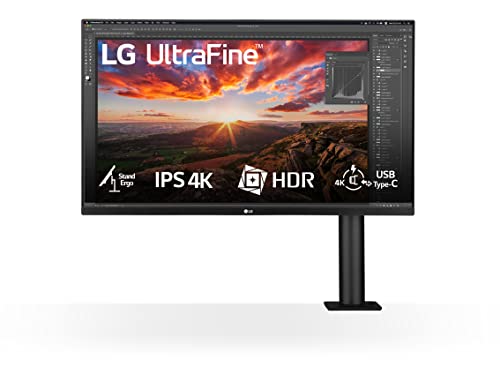
BenQ markets the PD2705U toward designers but it works equally well for programming. The IPS panel covers 95% DCI-P3 and 100% sRGB. What sets it apart for developers is the Ergo stand, which attaches to the back of the display and swings out to the side, clearing desk space in front of the keyboard. The stand also provides height, tilt, pivot, and swivel. A KVM switch lets you connect two computers and toggle between them with a button press, useful if you run a personal machine and a work machine on the same desk. USB-C carries 96W, slightly higher than most competitors at this price.

Acer B277K 27" 4K IPS -- Budget 4K that keeps up
The Acer B277K brings 4K IPS to a lower price than the rest of the list without sacrificing the core attributes that matter for coding. The panel covers 100% sRGB and supports HDR400. The stand adjusts for height, tilt, and pivot. Connectivity is USB-C plus HDMI and DisplayPort. Color consistency is slightly behind the Dell UltraSharp, and the stand feels less premium, but the pixel density is identical. If your budget limits the choice, this is where to start.
What matters most
What to consider
Start with panel size and resolution together. A 27-inch 1440p monitor at 100% scaling gives you plenty of vertical space for code without forcing OS-level scaling. A 27-inch 4K display is sharper but works best with 125-150% scaling, which can blur pixels in apps that have not updated their DPI handling. Ultrawide 34-inch panels at 3440x1440 maximize horizontal space without the scaling problem.
What to consider
Panel technology affects how colors look off-axis. IPS panels stay accurate when viewed from a slight angle; VA panels shift slightly but offer deeper blacks. For coding, either works, though IPS is more consistent.
What to consider
USB-C with power delivery simplifies desk cable management for laptop users. A single cable connects, charges, and carries video. Prioritize this if you dock and undock frequently.
What to consider
Connecting a coding monitor to a standing desk also makes sense -- check whether the stand includes height adjustment or whether you need a VESA arm.
What to consider
For related reading, see our [best computer monitors for eye strain](/articles/best-computer-monitor-for-eye-strain) and [best computer monitors for productivity](/articles/best-computer-monitor-for-productivity) guides. For information on how we select and evaluate products, visit our [methodology](/methodology) page.
Frequently asked
1440p (2560x1440) hits the sweet spot for most programmers on a 27-inch display. You get sharp text without needing heavy display scaling, and fonts stay crisp at typical viewing distances. 4K at 27 inches is sharper still but requires scaling on Windows, which can blur some UI elements in older developer tools.
Size matters mainly for how many editor columns and terminals you can display side by side. A 27-inch 1440p monitor lets you run two code windows comfortably. Ultrawide panels (34-inch, 21:9) eliminate the need for a second display and keep all windows on one screen without a physical bezel gap in the middle.

Tom Reeves has reviewed consumer electronics for over a decade, with a focus on televisions, monitors, laptops, and smart home devices. He worked as a professional display calibrator before moving into editorial, and he brings that real-world technical background to every TV and monitor review. At TheTestedHub, Tom covers display calibration, computer monitors, laptops and 2-in-1s, smart home platforms, home theater setups, and HDR performance.
You might also like
5 Best Computer Monitors to Use as a TV 2026 | Dual-Purpose Picks

5 Best Computer Monitors Under 100 2026 | Sharp screen, tight budget

5 Best Computer Monitors for MacBook 2026 | Sharp color, one cable

5 Best Computer Monitors for Productivity 2026 | More screen, less switching

5 Best Computer Screens for Graphic Designers 2026 | Colour-Accurate Displays That Deliver

5 Best Computer Monitors With Speakers 2026 | Built-In Audio Done Right

5 Best Computer Screens for Eye Strain 2026 | Protect Your Vision All Day
