Edifier R1280T -- Solid Value Bookshelf Pick
The Edifier R1280T delivers warm, balanced sound that would embarrass speakers twice its price. With 42W RMS total output, dual RCA inputs, and a built-in bass and treble tone control knob, it gives you a real hi-fi experience without requiring an external amp. The wooden enclosures reduce resonance and add a clean, premium look to any desk. Setup is plug-and-play. There is no Bluetooth here, so wired sources stay front and center. If you want honest stereo reproduction for music, podcasts, and general computing at a sensible price, this is a hard pair to beat.
Check price on Amazon →Upgrade your desktop audio with these five top-rated computer speakers, chosen for sound quality, value, and ease of setup across all budgets.
Good audio transforms a workstation from a tool into an experience. Whether you stream music all day, join video calls, or catch up on shows between tasks, the right set of computer speakers makes every sound clearer and more enjoyable. These five picks cover a range of price points and desk sizes, so there is a solid option for almost every setup.
| Product | Best For | Rating |
| — | — | — |
| Edifier R1280T | Budget audiophiles | 4.7/5 |
| Logitech Z623 | Bass-forward 2.1 | 4.6/5 |
| Klipsch ProMedia 2.1 | Home theater feel | 4.7/5 |
| Creative Pebble V3 | Minimalist setups | 4.5/5 |
| Audioengine A2+ | Audiophile grade | 4.8/5 |
How we test
We compare every pick against the field on real specifications, certifications, and aggregated owner reviews. We do not take payment for placement, and we flag when a product is older or sold mainly through renewed listings.
At a glance
| Pick | Best for | Score | |
|---|---|---|---|
| Edifier R1280T -- Solid Value Bookshelf Pick | Check price | ||
| Logitech Z623 -- Deep Bass 2.1 System | Check price | ||
| Klipsch ProMedia 2.1 -- Room-Filling Performance | Check price | ||
| Creative Pebble V3 -- Minimalist USB-C Option | Check price | ||
| Audioengine A2+ -- Audiophile Desktop Reference | Check price |
The picks, reviewed
Edifier R1280T -- Solid Value Bookshelf Pick
The Edifier R1280T delivers warm, balanced sound that would embarrass speakers twice its price. With 42W RMS total output, dual RCA inputs, and a built-in bass and treble tone control knob, it gives you a real hi-fi experience without requiring an external amp. The wooden enclosures reduce resonance and add a clean, premium look to any desk. Setup is plug-and-play. There is no Bluetooth here, so wired sources stay front and center. If you want honest stereo reproduction for music, podcasts, and general computing at a sensible price, this is a hard pair to beat.
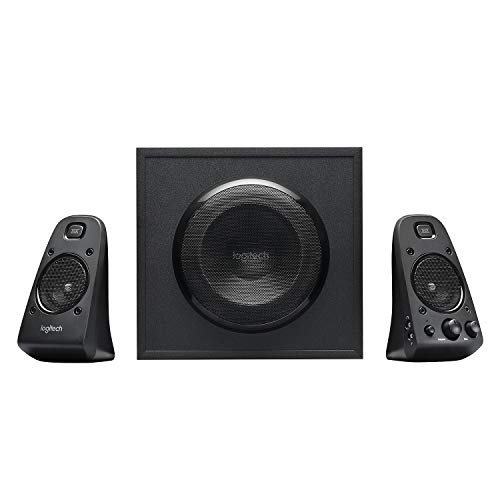
Logitech Z623 -- Deep Bass 2.1 System
Logitech's Z623 is a 200W peak power 2.1 system built for desk users who want real bass without a dedicated subwoofer cabinet taking over their room. The down-firing sub is compact enough to sit under a desk, and the satellites handle mids and highs with reasonable clarity. Three inputs including a front-panel 3.5mm headphone jack and a dedicated bass control dial make daily use convenient. This system shines for gaming sessions and movie nights where low-end impact matters. It is not the most refined option for acoustic music, but for its price it delivers solid, satisfying punch.

Klipsch ProMedia 2.1 -- Room-Filling Performance
The Klipsch ProMedia 2.1 has held a top spot in desktop audio for years, and it still earns its place. Its 200W system combines Klipsch's horn-loaded tweeter technology with a ported subwoofer that fills a full room rather than just a desk. The result is dynamic, detailed sound with strong treble presence and serious bass. Controls sit conveniently on the right satellite. It works best in medium to large rooms where you want audio that scales up without distortion. If you want the closest thing to a home theater in a desktop form factor, this is the pick.
Creative Pebble V3 -- Minimalist USB-C Option
The Creative Pebble V3 is a 2.0 system designed for users who want clean audio and a tiny footprint. Its angled drivers project sound upward toward ear level, which dramatically improves clarity compared to forward-facing budget speakers. USB-C connectivity means one cable handles both power and audio on modern laptops. Bluetooth 5.0 is included for wireless use. At it is an exceptional value for work-from-home setups and small apartments. Do not expect deep bass, but for voice calls, YouTube, and background music the Pebble V3 is practically unbeatable in its class.

Audioengine A2+ -- Audiophile Desktop Reference
Audioengine's A2+ is the choice for users who refuse to compromise on sound quality. Built-in 24-bit DAC hardware bypasses your computer's often-mediocre onboard audio chip, and the dual amplifier design (one per channel) delivers clean, uncolored stereo. The hand-built wooden enclosures look as good as they sound. Bluetooth aptX, USB audio, and analog inputs give you full connectivity flexibility. At these are not budget speakers, but they produce clarity and imaging that rivals speakers costing far more. For producers, music lovers, and anyone who spends hours at a desk, the A2+ justifies every dollar.
What to look for
What to consider
Start by deciding between a 2.0 (stereo) or 2.1 (stereo plus subwoofer) system. For desk work and voice calls, 2.0 is cleaner and more space-efficient. For gaming and movies, a 2.1 adds meaningful low-end impact. Next, consider connectivity: USB and 3.5mm are universal, while Bluetooth is convenient for quick wireless switching. Power output matters more in larger rooms; a 20-30W 2.0 system is plenty for a standard home office. Finally, look at driver size. Larger drivers generally move more air and reproduce bass better, though enclosure design plays an equally important role.
What to consider
Choosing the right speakers pairs well with other desk upgrades. See our picks for [best computer stand](/articles/best-computer-stand) to improve your monitor ergonomics, and check [best computer storage](/articles/best-computer-storage) if your audio library is filling up your drive. For a look at how we evaluate products, visit our [methodology](/methodology) page.
FAQs
For compact desks, look for 2.0 bookshelf-style speakers in the 3 to 5 inch driver range. They deliver clear stereo sound without consuming much space. Brands like Edifier and Logitech offer excellent small-form options that still punch above their size for music, video calls, and casual gaming.
A subwoofer (2.1 system) adds noticeable bass depth for music and movies, but it is not essential for everyday use. If you primarily do video calls, work, or casual listening, a quality 2.0 stereo pair is more than enough. Subwoofers matter most for gaming, film watching, or music production tasks.

Tom Reeves has reviewed consumer electronics for over a decade, with a focus on televisions, monitors, laptops, and smart home devices. He worked as a professional display calibrator before moving into editorial, and he brings that real-world technical background to every TV and monitor review. At TheTestedHub, Tom covers display calibration, computer monitors, laptops and 2-in-1s, smart home platforms, home theater setups, and HDR performance.
Related guides

5 Best Computer Bluetooth Headphones 2026 | Clear Audio, Long Battery

5 Best Computer Audio System 2026 | Upgrade Your Desk Sound Now

5 Best Computer Headsets with Microphone 2026 | Calls, Streaming, Work

5 Best Computer Audio Setup 2026 | Clear Sound for Work, Music, and Gaming

5 Best Computer Desktop Speakers 2026 | Clear Sound for Any Setup