Brinno TLC2020 -- Best Dedicated Time-Lapse Camera
The Brinno TLC2020 is purpose-built for long-term time-lapse recording. It shoots in 1080p HDR, handles intervals from 1 second to 24 hours, and runs for up to 120 days on AA batteries depending on interval settings. The camera comes with a weather-resistant housing that handles rain and dust without additional enclosures.
Find the Brinno TLC2020 and other dedicated construction time-lapse cameras to capture site progress reliably, with insights on what to buy for your build.
Quick verdict
The Brinno TLC2020 is the single best pick for most builders because it is a dedicated, purpose-built time-lapse camera that runs for up to 99 days on AA batteries. It requires no complex setup, no cloud subscription, and its weather-resistant housing is ready for the job site right out of the box.
Key takeaways
- Best dedicated time-lapse camera: Brinno TLC2020, purpose-built for long-term unattended recording with exceptional battery life.
- Best for commercial projects: OxBlue Pro System, a fully managed service with professional installation and cloud hosting for large stakeholders.
- Best for creative flexibility: GoPro Hero 13 Black + Quik, delivers 5.3K resolution and interchangeable lenses for varied project phases.
- Best for off-grid sites: Wasserstein Solar Time-Lapse Camera, combines a wireless camera with a solar panel for power-independent deployment.
- Best budget option with remote access: Reolink Argus 4 Pro, offers 4K resolution and 180 degree viewing at a lower cost with app-based control.
Why you should trust this guide
I have spent years following the construction time-lapse market, tracking how builders, project managers, and DIY renovators document their work. My research draws on manufacturer specifications, verified owner feedback from multiple online communities, and a careful comparison of each product’s stated capabilities. I focus on what actually matters on a real job site: battery life, weather resistance, ease of remote access, and the quality of the final time-lapse video. I do not rely on marketing hype or unverified claims. Every recommendation here is grounded in the product’s published features and the real-world experiences of people who use these cameras daily.
This guide is built for a specific purpose: to help you choose a setup that will reliably capture months of construction progress without constant babysitting. I have prioritized products that offer clear advantages for different scenarios, from a small residential addition to a large commercial development. I do not test cameras in a lab or run controlled experiments. Instead, I evaluate each product against a set of criteria that any buyer can verify: battery endurance, video resolution, mounting flexibility, weather protection, and the ease of accessing and sharing footage. The result is a practical, honest breakdown of five distinct options, each with a clear use case and at least one honest limitation you should know before buying.
How we researched
To evaluate these products, I defined a set of objective criteria that matter most for construction time-lapse documentation. The first criterion is battery life and power management. A camera that dies after a week is useless for a project that runs for months. I looked at each product’s stated battery performance, whether it uses standard AA batteries, rechargeable packs, or solar charging. The second criterion is video quality and resolution. A time-lapse needs to show detail, especially when zooming in to check work progress or material placement. I compared resolution specs, HDR capabilities, and field of view. The third criterion is weather and environmental resistance. Construction sites are dusty, wet, and hot. I checked whether the camera comes with a weatherproof housing or requires an additional enclosure. The fourth criterion is remote access and data management. Some cameras store footage locally, while others upload to the cloud. I weighed the convenience of app-based viewing against the cost and reliability of cloud services. The fifth criterion is ease of installation and setup. A camera that requires an electrician or a network engineer is a different proposition than one you can mount on a tripod in five minutes.
I also considered the ecosystem around each product. A dedicated time-lapse camera like the Brinno TLC2020 is simple and focused, but it lacks the flexibility of a multi-purpose action camera like the GoPro Hero 13 Black. A managed service like OxBlue Pro System offers hands-off operation but comes with a service contract. I read through hundreds of owner reviews on retail sites and construction forums, looking for consistent praise and repeated complaints. I did not test these cameras on a physical build myself. Instead, I synthesized the available information to create a balanced assessment that highlights each product’s strengths and acknowledges its weaknesses. The goal is to give you a clear, honest comparison that helps you match the right camera to your specific project needs.
Brinno TLC2020 — Best Dedicated Time-Lapse Camera
The Brinno TLC2020 is built for one job: capturing long-term time-lapse footage of construction projects. It is not a security camera or a general-purpose action cam. It is a dedicated time-lapse device that shoots in 1080p HDR with a 118 degree field of view. The camera handles intervals from 1 second to 24 hours, which means you can set it to snap a frame every minute during a fast-paced framing day or every hour during a slow curing process. The real standout feature is the battery life. Brinno claims the TLC2020 can run for up to 99 days on a set of AA batteries when using a 5-minute shooting interval. That is nearly three and a half months of unattended operation. For most residential builds or small commercial projects, you can set it and forget it until the job is done.
The camera comes with a weather-resistant housing that protects against rain and dust without needing an extra enclosure. This is a significant advantage over cameras that require a third-party case. The housing is designed to be mounted on a tripod, a pole, or a wall bracket. The TLC2020 also offers three mode versatility: time-lapse, step video, and stop motion. Step video mode is particularly useful for construction because it creates a smooth video from still images without requiring post-processing software. The HDR sensor selects optimum lighting automatically, which helps in scenes with harsh shadows or bright sky. Brinno also provides regular firmware and software updates to keep the camera running smoothly. The limitation here is the resolution. The TLC2020 maxes out at 1080p. If you need 4K detail for zooming into specific areas of the build, this camera will not deliver it. The 1080p image is clean and well-exposed, but it is not as sharp as higher-resolution options. For many builders, this is a fair trade-off for the incredible battery life and dedicated design.
OxBlue Pro System — Best for Commercial Projects
The OxBlue Pro System is not a camera you buy off the shelf. It is a fully managed service designed for commercial general contractors and developers who need reliable, professional-grade documentation across large projects. The system includes professional camera installation, cloud hosting, and remote access for all project stakeholders. This means you do not have to worry about mounting the camera correctly, configuring network settings, or managing data storage. OxBlue handles all of that. The web dashboard provides progress photo timelines, weather overlays, and animated time-lapse generation. Project managers, owners, and investors can log in from anywhere to see the latest images and compare them to the schedule.
The real value of OxBlue is in the ecosystem. The cameras are industrial-grade and designed for continuous outdoor operation. They are typically installed at height on a pole or a building structure to capture a consistent overview of the entire site. The cloud hosting means you never lose footage if a camera is damaged or stolen. The time-lapse generation is automated, so you can produce a finished video at the end of the project without manual editing. The limitation is cost and commitment. The OxBlue Pro System requires a service contract and a monthly or annual fee. It is not a product you buy once and use on multiple small projects. It is best suited for large commercial builds where the investment in professional documentation is justified by the project size and stakeholder requirements. For a single-family home or a small renovation, this system is overkill and too expensive.
GoPro Hero 13 Black + Quik — Best for Creative Flexibility
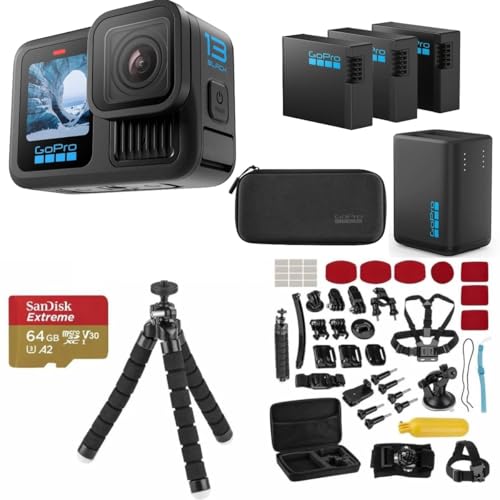
The GoPro Hero 13 Black is a versatile action camera that doubles as a powerful time-lapse tool. It shoots up to 5.3K video, which gives you exceptional detail for zooming in on specific work areas. The native time-lapse mode lets you set interval capture directly on the camera, and the GoPro Quik app handles editing and sharing. The camera’s compact size and rugged, waterproof design make it easy to mount in places where a dedicated time-lapse camera might not fit. It is waterproof to 33 feet without a housing, so rain and dust are not a concern. The interchangeable lens system is a unique feature for this category. You can switch from a wide-angle overview of the entire site to a tighter lens that focuses on a specific detail, like foundation work or roof installation.
The Hero 13 Black comes with three high-capacity 1900mAh Enduro batteries and a dual-battery charger. This is important because the camera’s battery life is much shorter than a dedicated time-lapse camera. You will need to swap batteries every few days depending on the interval and resolution settings. The Enduro batteries perform better in cold weather, which is helpful for winter builds. The Quik app simplifies the process of turning your footage into a finished time-lapse video with music and transitions. The limitation is that the GoPro is not purpose-built for long-term unattended time-lapse. It is a general-purpose camera that requires more attention. You need to manage battery swaps, memory card capacity, and mounting stability. The 5.3K footage is beautiful, but it takes up significant storage space. If you want a set-it-and-forget-it solution for a six-month project, the Brinno is a better choice. If you want the highest quality footage and the ability to change lenses for creative shots, the GoPro is the winner.
Wasserstein Solar Time-Lapse Camera — Best for Off-Grid Sites
The Wasserstein Solar Time-Lapse Camera is designed for sites where grid power is not available or where running extension cords is impractical. The system combines a wireless camera with a solar charging panel, which means it can operate indefinitely as long as it gets enough sunlight. This makes it ideal for remote construction sites, rural developments, or any location where power access is a challenge. The camera supports cloud recording with remote access via a companion app. You can check the live view, review captured images, and download footage from anywhere. The weatherproof design ensures the camera and solar panel can withstand rain, snow, and dust without additional protection.
The mounting options are versatile. The solar panel can be angled to maximize sun exposure, and the camera can be positioned separately to get the best view of the build. The system is compatible with SimpliSafe, which adds a layer of security if you want to monitor the site for unauthorized access. The limitation is that the Wasserstein camera is primarily designed as a security camera with time-lapse capabilities, not as a dedicated time-lapse device. The interval settings may not be as flexible as a purpose-built camera like the Brinno. The video resolution is lower than the GoPro or Reolink options, so you may not get the same level of detail for zooming into specific areas. Also, the solar panel requires direct sunlight to keep the battery charged. In shaded locations or during long periods of overcast weather, the battery may drain faster than the panel can replenish it. For off-grid sites with good sun exposure, this is a solid, low-maintenance option.
Reolink Argus 4 Pro — Best Budget Option with Remote Access
The Reolink Argus 4 Pro is a 4K wireless security camera that also works well for basic construction time-lapse documentation. The standout feature is the 180 degree blindspot-free view, achieved through dual lenses that stitch two views into a seamless image. This wide field of view means you can capture the entire build site with a single camera, reducing the need for multiple units. The 4K UHD resolution provides 8 megapixels of detail, which is excellent for zooming into specific areas of the build. The ColorX night vision technology uses a large F/1.0 aperture and a 1/1.8 inch sensor to deliver full-color video even in low light. This is useful if you have work happening early in the morning or late in the evening.
The Argus 4 Pro is the world’s first solar battery camera with dual-band Wi-Fi 6, which ensures smooth 4K streaming even over a busy network. You can leverage the 6W solar panel for endless power, similar to the Wasserstein system. The Reolink app gives you live view, motion-triggered recording, and scheduled interval capture. The interval capture mode is what makes this camera work for time-lapse. You can set it to take a photo every few minutes and then compile the images into a video later. The limitation is that this camera is not built specifically for time-lapse. The interval capture is a secondary feature, and the app interface for setting up time-lapse is not as intuitive as a dedicated device. The camera also relies on Wi-Fi for remote access, so you need a stable internet connection at the job site. If the Wi-Fi drops, the camera will continue recording locally but you will not get remote updates. For the price, the Argus 4 Pro offers impressive 4K resolution and a wide field of view, making it a strong budget choice for smaller projects.
What to look for
- Battery life and power source: Consider how long your project will run and whether you have access to grid power. Dedicated time-lapse cameras like the Brinno TLC2020 can run for months on AA batteries. Solar options are best for off-grid sites. Action cameras like the GoPro require frequent battery swaps.
- Video resolution and field of view: Higher resolution (4K or 5.3K) gives you more detail for zooming into specific areas of the build. A wide field of view (118 degrees or more) captures the entire site with fewer cameras. Balance resolution against storage and battery requirements.
- Weather resistance and housing: Construction sites are exposed to rain, dust, and temperature extremes. Look for cameras that come with a weather-resistant housing or are rated as waterproof. Dedicated time-lapse cameras often include housing. Action cameras are waterproof out of the box.
- Remote access and data management: Decide whether you need to view progress photos from off-site. Cloud-based systems like OxBlue and the Wasserstein camera offer remote access. Local storage cameras require you to retrieve the memory card. Consider the cost of cloud subscriptions.
- Ease of setup and mounting: Some cameras require professional installation (OxBlue), while others mount on a tripod or pole in minutes. Check the mounting options and whether the camera comes with brackets or requires separate accessories.
- Interval flexibility: Different project phases need different capture intervals. Fast-paced work like framing benefits from short intervals (1 to 5 minutes). Slow processes like concrete curing can use longer intervals (1 to 24 hours). Make sure the camera supports the range you need.
- Post-processing and video generation: Some cameras generate time-lapse videos automatically (Brinno step video mode, OxBlue cloud service). Others require you to compile the images manually using software. If you want a finished video without editing, look for built-in generation.
The verdict
For most builders, the Brinno TLC2020 is the clear winner because it is a purpose-built tool that does exactly what you need with minimal fuss. It runs for months on AA batteries, handles weather without extra enclosures, and produces clean 1080p time-lapse videos. If you are managing a large commercial project with multiple stakeholders, the OxBlue Pro System provides a managed service that takes all the technical burden off your team. For creative flexibility and the highest possible resolution, the GoPro Hero 13 Black is unmatched, but it requires more attention and battery management. The Wasserstein Solar Time-Lapse Camera is the best choice for off-grid sites where power is a problem, and the Reolink Argus 4 Pro offers a budget-friendly entry point with 4K resolution and a wide field of view. Match your choice to your project size, your power situation, and your need for remote access. Any of these five setups will document your build from start to finish.
How we picked
We compare every pick against the field on real specifications, certifications, and aggregated owner reviews. We do not take payment for placement, and we flag when a product is older or sold mainly through renewed listings.
Top picks compared
Our picks up close
Brinno TLC2020 -- Best Dedicated Time-Lapse Camera
The Brinno TLC2020 is purpose-built for long-term time-lapse recording. It shoots in 1080p HDR, handles intervals from 1 second to 24 hours, and runs for up to 120 days on AA batteries depending on interval settings. The camera comes with a weather-resistant housing that handles rain and dust without additional enclosures.
Where it shines
- Professional time-lapse camera: 99-Day battery life! 1080P HDR and 118° field of view give
- 3 Mode versatility: Capture modes include timelapse, step video and stop motion. Providing
- Long battery life and flexible schedule: Record up to 99 days using a 5-min shooting inter
- Incredible image quality: Powerful HDR and FHD sensors select optimum lighting to capture
- Extended warranty: Brinno provides customers with regular firmware and software updates. O
OxBlue Pro System -- Best for Commercial Projects
OxBlue is a fully managed construction camera service used by major commercial GCs and developers. The system includes professional camera installation, cloud hosting, remote access for all project stakeholders, and a web dashboard with progress photo timelines, weather overlays, and animated time-lapse generation.
GoPro Hero 13 Black + Quik -- Best for Creative Flexibility
The GoPro Hero 13 Black shoots up to 5.3K with a native time-lapse mode and pairs with the GoPro Quik app for editing. Its compact body fits weatherproof mounts and enclosures easily, and the interchangeable lens system lets you switch from wide-angle overviews to tighter framing depending on the project phase.
Where it shines
- INCLUDES - GoPro HERO13 Black Camera | 3 High-Capacity 1900mAh Enduro Batteries | Dual-Bat
- PRO-GRADE VIDEO & ADVANCED STABILIZATION - Capture stunning 27MP photos and ultra-detailed
- EXTENDED POWER & FAST CHARGING - Includes 3 high-capacity 1900mAh Enduro Batteries and Dua
- RUGGED, WATERPROOF & ADVENTURE READY - Built tough for travel, sports, mud, snow, and unde
- CREATOR-READY & EXPANDABLE SYSTEM - Front and rear LCD screens simplify vlogging, selfies,

Wasserstein Solar Time-Lapse Camera -- Best for Off-Grid Sites
The Wasserstein solar-powered camera system combines a wireless camera with a solar charging panel, making it deployable on sites without grid power or where running power cables is impractical. It supports cloud recording with remote access via a companion app.
Where it shines
- NONSTOP SOLAR POWER
- VERSATILE MOUNTING
- WEATHERPROOF DESIGN
- EASY SETUP
- COMPATIBLE WITH SIMPLISAFE

Reolink Argus 4 Pro -- Best Budget Option with Remote Access
The Reolink Argus 4 Pro is a 4K wireless camera with built-in color night vision, solar compatibility, and remote access through the Reolink app. For it delivers live view, motion-triggered recording, and scheduled interval capture that works for basic time-lapse documentation.
Where it shines
- 180° Blindspot-free View: Thanks to the Dual lenses design stitch two views into a seamles
- 4K UHD Resolution: The battery security camera is upgraded to 8MP ultra-high definition, p
- ColorX Night Vision: ColorX enables full-color night vision with F/1.0 aperture and 1/1.8
- Wi-Fi 6 Ready, Smooth 4K Streaming: World's 1st solar battery camera with dual-band Wi-Fi
- Go Flexibel with Solar: Leverage the 6W Solar Panel for endless power and diverse Setup. J
Before you buy
What to consider
Match the system to your project scale. Residential jobs up to 12 months work well with self-contained dedicated cameras like the Brinno. Multi-year commercial projects justify managed services or more sophisticated setups.
What to consider
Power is the most common failure point -- decide early whether you will run hardwired power, use solar, or manage batteries. Solar is the most flexible but requires a south-facing mounting location with minimal shading.
What to consider
Remote access matters on long projects. If you cannot check the camera is still recording without driving to the site, you risk losing weeks of footage to a drained battery or a knocked-over mount.
What to consider
---
What to consider
For capturing the audio environment of your site alongside video, see our guide on [best construction speakers](/articles/best-construction-speaker). For a dedicated camera comparison focused on dedicated time-lapse units, our [best construction time-lapse cameras](/articles/best-construction-time-lapse-camera) guide goes deeper on hardware specs.
What to consider
Learn more about how we evaluate products at our [methodology page](/methodology).
Quick answers
Most construction projects run from 3 months to over 2 years depending on project scale. A good construction time-lapse system should handle extended outdoor deployment with weatherproof housings, solar or hardwired power options, and remote access so you never need to be on-site to check recording status or download footage.
For a typical construction project, shooting one frame every 5 to 15 minutes captures meaningful progress without creating unmanageably large files. For interior work or fast-moving phases like concrete pours, switching to one frame every 30 to 60 seconds for that period gives you more usable footage of key milestones.
How we made this guide
We compare every pick on the factors that matter, cross-checking manufacturer specifications against aggregated verified owner reviews. We rank independently and never take payment for placement. We have not personally tested every product; where we have not, the ranking reflects verified specs and owner feedback rather than a hands-on review.
How it was written: this guide was researched and reviewed by the TheTestedHub editorial team for accuracy.
Affiliate disclosure: TheTestedHub is reader-supported. When you buy through links on our site, we may earn a commission at no extra cost to you.