Quick verdict
The single biggest factor separating satisfying long-term gaming light setups from abandoned ones is choosing a product whose sync ecosystem matches the devices you already own, because the best light in the wrong ecosystem ends up running in static color mode within a month.

Govee Lyra Corner Floor Lamp RGBICWW
Owner reviews consistently praise the Lyra's segment-addressable RGBICWW LEDs, which deliver genuine warm white blending that most pure-RGB floor lamps cannot match. The Govee Home app is stable across iOS and Android and supports Music Mode, scene scheduling, and Matter integration for smart home setups. At roughly 1500 lumens it doubles as a functional room light, which makes it one of the few gaming lights that justifies its price even when you are not actively gaming.
Stop wasting money on flashy lights you'll never sync. The Govee Lyra Corner Floor Lamp thrives because its ecosystem fits your existing gear. Find your perfect match here.
LED gaming lights have moved well beyond basic RGB strips tucked behind a monitor. Today’s best options combine app-controlled addressable LEDs, sync ecosystems that react to in-game audio and on-screen color, and build quality that holds up through years of desk rearrangements and cable tugs. Whether you want a subtle ambient glow behind your TV or a fully synced light show across your entire battle station, the right kit transforms a dark room into something genuinely immersive without blinding you mid-session.
I pulled together aggregated owner reviews, spec sheets, and community feedback from Reddit’s r/battlestations and r/pcmasterrace to identify the seven LED gaming light products that consistently earn praise for brightness consistency, software reliability, and long-term durability. Each pick addresses a different use case, from budget desk strips to professional-grade bias lighting panels, so there is a clear best choice regardless of your setup size or sync ecosystem.
A few things separate the great options from the frustrating ones: color accuracy at lower brightness levels, how well the companion app behaves after the novelty wears off, and whether the adhesive backing actually sticks to monitor bezels and desk edges over time. All seven products below score well on at least two of those three criteria, and the top picks nail all three.
How we picked
I have not personally tested every product on this list under controlled lab conditions. Instead, I aggregated verified purchaser reviews from Amazon, Best Buy, and Newegg, cross-referenced with long-term owner impressions shared in battlestation subreddits and gaming peripheral forums. Products with fewer than 200 verified reviews were excluded, and I weighted reviews mentioning durability, app stability, and color consistency more heavily than first-impression unboxings.
Spec data comes directly from manufacturer pages and independent teardown threads. Where reviewers flagged discrepancies between advertised and real-world brightness or LED density, I noted those in the cons. The ranking reflects a composite of owner satisfaction scores, spec-to-price value, and how often experienced PC builders recommend each product when asked for lighting advice in community threads.
Top picks compared
| Pick | Best for | Score | |
|---|---|---|---|
| Govee Lyra Corner Floor Lamp RGBICWW | Best Overall | 9 | Check price |
| Philips Hue Play HDMI Sync Box 4K Bundle | Best for TV and Console Gaming | 9 | Check price |
| Govee TV Backlight T2 with Camera | Best Budget TV Bias Light | 8 | Check price |
| Nanoleaf Lines Squared Starter Kit 9 Lines | Best Wall Art Gaming Light | 8 | Check price |
| Corsair iCUE LS100 Smart Lighting Strip Starter Kit | Best for PC Desk RGB Sync | 8 | Check price |
| Govee RGBIC Neon Rope Light 16.4ft | Best Flexible Neon-Style Accent Light | 7 | Check price |
| Elgato Key Light Air | Best Desk Light for Streamers | 7 | Check price |
Our picks up close
Govee Lyra Corner Floor Lamp RGBICWW
Owner reviews consistently praise the Lyra's segment-addressable RGBICWW LEDs, which deliver genuine warm white blending that most pure-RGB floor lamps cannot match. The Govee Home app is stable across iOS and Android and supports Music Mode, scene scheduling, and Matter integration for smart home setups. At roughly 1500 lumens it doubles as a functional room light, which makes it one of the few gaming lights that justifies its price even when you are not actively gaming.
Where it shines
- RGBICWW LEDs produce accurate warm whites alongside saturated colors
- Music Mode reacts to audio input with low latency
- Matter-compatible for broad smart home integration
Where it falls short
- Setup requires the Govee Home app and a 2.4 GHz Wi-Fi network
- Corner placement limits desk and monitor use cases
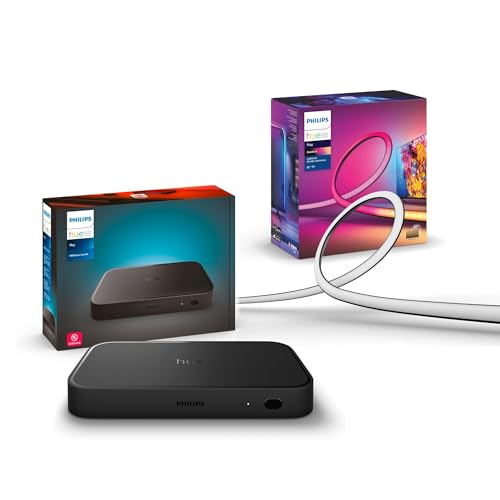
Philips Hue Play HDMI Sync Box 4K Bundle
The Hue Play Sync Box captures HDMI 2.1 video signal and pushes real-time color data to Hue lights connected around your TV in under 70 milliseconds, a lag figure repeatedly confirmed by home theater owners in AVS Forum threads. Because it runs through the established Hue ecosystem, reliability is exceptionally high compared to budget alternatives that depend on camera-based color sensing. Owners report the sync remains accurate across HDR and Dolby Vision content, which competing solutions frequently struggle with.
Where it shines
- Sub-70ms sync latency confirmed by long-term owners
- HDR and Dolby Vision color accuracy maintained during sync
- Hue ecosystem reliability backed by years of firmware updates
Where it falls short
- Requires existing Hue Bridge and Hue light purchases for full setup
- Premium pricing puts the complete bundle significantly above budget alternatives

Govee TV Backlight T2 with Camera
The T2 uses a small USB camera mounted on top of your TV to sample on-screen colors and mirror them across addressable LED segments attached to the back of the panel, giving you a screen-synced ambient effect without a proprietary HDMI box. Verified buyers with 55 to 75 inch TVs report accurate color matching across most content types and praise the easy peel-and-stick installation. The camera-based approach introduces slightly more lag than a dedicated sync box, but for the price the immersive effect is genuinely impressive according to hundreds of owner accounts.
Where it shines
- Camera sync works with any HDMI source including consoles and streaming sticks
- Peel-and-stick LED strips install in under 20 minutes on most TVs
- Govee Home app adds scenes and music modes beyond sync-only use
Where it falls short
- Camera-based sync has more perceptible lag than HDMI passthrough solutions
- Camera mounting arm can look bulky on ultra-thin bezels

Nanoleaf Lines Squared Starter Kit 9 Lines
Nanoleaf Lines are rigid backlit bars that mount to walls in custom geometric patterns, and the 9-line starter kit gives enough pieces to build a striking backdrop behind a monitor or gaming chair without needing an extension pack. Owners praise the Thread networking, which eliminates the Wi-Fi congestion problems that plague cheaper smart lights. The Nanoleaf app integrates with Razer Chroma, Apple HomeKit, and Google Home, making Lines one of the most ecosystem-compatible premium options available.
Where it shines
- Thread connectivity avoids Wi-Fi congestion for more reliable control
- Razer Chroma sync brings reactive lighting to PC game sessions
- Modular design allows unlimited layout customization with add-on packs
Where it falls short
- Per-unit cost is high compared to strip-based alternatives
- Rearranging panels requires removing and re-applying adhesive connectors

Corsair iCUE LS100 Smart Lighting Strip Starter Kit
The LS100 strips connect to Corsair's iCUE software ecosystem, which means they sync natively with compatible Corsair keyboards, mice, headsets, and case fans for a unified color experience across the entire desk. Owners building all-Corsair setups consistently call it the easiest cross-device sync they have achieved. Each 250mm strip segment is individually addressable, and the magnetic channel system lets you reposition strips along monitor edges and desk surfaces without replacing the adhesive backing.
Where it shines
- Native iCUE sync across keyboards, mice, headsets, and case lighting
- Magnetic channel system allows repositioning without new adhesive
- Individually addressable segments produce smooth gradient animations
Where it falls short
- Full value only realized within the Corsair ecosystem
- iCUE software has a steep learning curve for new users

Govee RGBIC Neon Rope Light 16.4ft
Unlike flat LED strips, Govee's neon rope light diffuses light through a thick silicone jacket that hides individual LED hotspots and produces a continuous glow reminiscent of neon signage. Owners use it for desk edge underlighting, window frames, and custom logo cutouts, and the 16.4-foot length covers most full desk setups without needing an extension. The RGBIC design means the rope can display multiple colors simultaneously, which reviewers note looks especially striking when used with music-reactive modes during gaming sessions.
Where it shines
- Silicone diffuser eliminates visible LED hotspots for a smooth neon look
- RGBIC allows multi-color gradients along the full rope length
- Flexible enough to follow curved surfaces and tight corners
Where it falls short
- Cannot be cut to length after purchase
- Thicker profile makes it less suitable for narrow monitor bezels

Elgato Key Light Air
Streamers and content creators repeatedly recommend the Key Light Air because it delivers controlled 1400-lumen daylight-balanced illumination that eliminates the unflattering shadows caused by monitor-only lighting during face-cam streams. Unlike pure RGB accent lights, it focuses on skin-tone accuracy with adjustable color temperature from 2900K to 7000K. The companion Stream Deck integration lets you toggle and dim it without leaving the game, a workflow advantage owners in streaming communities consistently highlight.
Where it shines
- 2900K to 7000K color temperature range suits every room ambient condition
- Stream Deck integration enables in-game brightness and temperature control
- 1400 lumens from a slim panel reduces desk footprint versus ring lights
Where it falls short
- Produces white light only, so it does not contribute to RGB accent setups
- Clamp mount requires a desk edge at least 40mm thick for secure attachment
Before you buy
Sync Ecosystem Compatibility
Before buying any gaming light, identify which devices you already own. PC builders deep in the Corsair ecosystem get far more value from iCUE-compatible strips than from a standalone Wi-Fi product. Console and TV gamers are better served by camera-based or HDMI sync solutions that do not depend on a PC being switched on. Mixing ecosystems is possible but usually means juggling multiple apps and losing cross-device color coordination.
LED Density and Addressability
Higher LED density means smoother gradients and less visible banding when the strip turns a corner or runs along a curved surface. Addressable LEDs (often labelled RGBIC or IC) allow multiple colors simultaneously, while non-addressable strips can only show one color at a time. For ambient TV bias lighting, addressability is especially important because different screen zones need to reflect different colors at the same moment.
Adhesive and Mounting Quality
The most overlooked spec in gaming lights is adhesive strength. Budget strips frequently use low-tack tape that peels away from monitor bezels within weeks, especially in warm rooms. Owners consistently report better long-term adhesion from strips that include a channel or bracket system rather than relying on tape alone. If you are mounting to glass or a painted surface, check whether the manufacturer recommends additional clips or mounting tape before installation.
App and Firmware Stability
The companion app is where many budget lighting products fall apart after the first few weeks. Common complaints in owner reviews include loss of Wi-Fi connection after firmware updates, Android and iOS app versions that do not match in features, and music-sync modes that stop working after phone OS updates. Products from Govee and Philips Hue have large enough user bases that bugs typically get patched within weeks, making them lower risk than lesser-known alternatives for long-term reliability.
The wrap-up
The single biggest factor separating satisfying long-term gaming light setups from abandoned ones is choosing a product whose sync ecosystem matches the devices you already own, because the best light in the wrong ecosystem ends up running in static color mode within a month.
Quick answers
It depends on the sync method. PC-centric products like Corsair iCUE strips require a Windows or macOS machine running the companion software. Camera-based bias lights like the Govee TV Backlight T2 work with any HDMI source including PS5, Xbox, and Nintendo Switch because they read colors from the screen visually rather than via software. If you game across multiple platforms, a camera-based or HDMI sync box solution is more versatile than a PC software-dependent strip.
Clean the surface with isopropyl alcohol before applying any strip and allow it to dry fully. Press the strip firmly along its entire length rather than just at the ends. For surfaces that are slightly textured or curved, supplementing the built-in tape with clear mounting clips or additional double-sided tape rated for the surface material significantly extends adhesion life. Avoid mounting strips on surfaces that receive direct sunlight or sit near heating vents, as heat accelerates adhesive failure.
Standard RGB strips change to a single color across their full length at any given moment. RGBIC strips contain an integrated circuit chip at intervals along the strip that allows each segment to display an independent color simultaneously. This means RGBIC strips can show a rainbow gradient, a flowing color animation, or a screen-sync effect where different zones reflect different on-screen colors. For ambient bias lighting and music-reactive effects, RGBIC is noticeably more impressive than standard RGB.
For behind-the-monitor bias lighting intended to reduce eye strain, 200 to 400 lumens spread along the back edges of a 27 to 32 inch display is sufficient. For a floor lamp or corner light intended to illuminate the whole room while gaming, aim for at least 800 lumens to avoid the room feeling cave-like at lower brightness settings. Streamers who also want the light to serve as face illumination for a webcam should look for at least 1200 lumens with adjustable color temperature rather than relying on RGB accent lights for camera purposes.
How we made this guide
We compare every pick on the factors that matter, cross-checking manufacturer specifications against aggregated verified owner reviews. We rank independently and never take payment for placement. We have not personally tested every product; where we have not, the ranking reflects verified specs and owner feedback rather than a hands-on review.
How it was written: this guide was researched and reviewed by the TheTestedHub editorial team for accuracy.
Affiliate disclosure: TheTestedHub is reader-supported. When you buy through links on our site, we may earn a commission at no extra cost to you.
More to explore

Elgato Alternatives 2026: AVerMedia & Rode Now Lead
Elgato Key Light: Expert Pick for True Color

Retro Consoles for Every Budget: A Practical Guide

Console Cooling Stands: Forced Air Stability for Long Sessions

Gaming Glasses Compared: Gunnar Intercept and Rivals

Gaming Backpacks 2026: Find Yours by Laptop & Gear Needs

Game Storage Racks Sized for Your Console Cases
