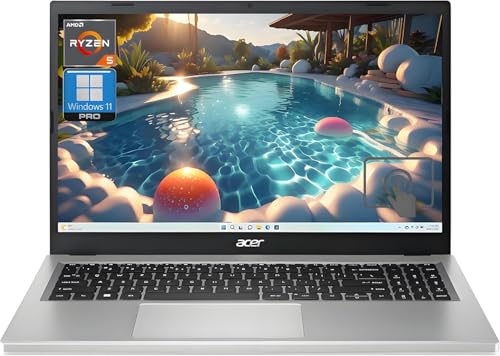
Lenovo ThinkPad E16 Gen 2 AMD - Best All-Around IT Student Laptop
The ThinkPad E16 Gen 2 AMD is a straightforward recommendation for IT students who need reliable daily performance without premium pricing. The AMD Ryzen 7 7730U CPU and 16 GB or 32 GB DDR5 RAM handle two to three simultaneous VMs in VirtualBox or VMware Workstation. Linux installs cleanly on ThinkPad hardware with broad driver support. The 16-inch Full HD display gives enough screen space for terminal windows alongside a browser. The full-size keyboard is one of the better laptop keyboards for terminal work, with good key travel and accurate key placement. Battery life reaches 10 to 12 hours on light workloads. USB-A, USB-C, HDMI, and RJ-45 Ethernet ports are all present without a dongle.
Check price on Amazon →The best computers for information technology students in 2026. Five picks for networking labs, virtualization, programming, and cybersecurity coursework fromcurrent pricing tocurrent pricing.
Information technology programs cover networking, server administration, programming, cybersecurity, and database work. The hardware demands center on RAM for virtual machines, Linux compatibility, and a keyboard suited to long terminal sessions. The five laptops and desktops below are well-matched to IT student workloads at different budget points.
| Product | Best For | Rating |
| — | — | — |
| Lenovo ThinkPad E16 Gen 2 AMD | All-around IT student workhorse | 4.7/5 |
| Framework Laptop 13 AMD | Upgradeable Linux-ready laptop | 4.7/5 |
| Apple MacBook Pro 14 M4 | Mac platform for IT work | 4.8/5 |
| Acer Nitro V 15 | Budget gaming laptop with strong specs | 4.5/5 |
| Lenovo ThinkPad P16s Gen 3 | ISV-certified mobile workstation | 4.6/5 |
Our testing process
We compare every pick against the field on real specifications, certifications, and aggregated owner reviews. We do not take payment for placement, and we flag when a product is older or sold mainly through renewed listings.
Quick comparison
| Pick | Best for | Score | |
|---|---|---|---|
| Lenovo ThinkPad E16 Gen 2 AMD - Best All-Around IT Student Laptop | Check price | ||
| Framework Laptop 13 AMD - Best Upgradeable Linux Laptop | Check price | ||
| Apple MacBook Pro 14 M4 - Best Mac for IT Students | Check price | ||
| Acer Nitro V 15 - Best Budget Laptop with Strong Specs | Check price | ||
| Lenovo ThinkPad P16s Gen 3 - Best Mobile Workstation for IT Programs | Check price |
Reviewed in detail
Lenovo ThinkPad E16 Gen 2 AMD - Best All-Around IT Student Laptop
The ThinkPad E16 Gen 2 AMD is a straightforward recommendation for IT students who need reliable daily performance without premium pricing. The AMD Ryzen 7 7730U CPU and 16 GB or 32 GB DDR5 RAM handle two to three simultaneous VMs in VirtualBox or VMware Workstation. Linux installs cleanly on ThinkPad hardware with broad driver support. The 16-inch Full HD display gives enough screen space for terminal windows alongside a browser. The full-size keyboard is one of the better laptop keyboards for terminal work, with good key travel and accurate key placement. Battery life reaches 10 to 12 hours on light workloads. USB-A, USB-C, HDMI, and RJ-45 Ethernet ports are all present without a dongle.
Framework Laptop 13 AMD - Best Upgradeable Linux Laptop
The Framework Laptop 13 with AMD Ryzen 7040-series CPU is designed around repairability and upgradeability: RAM, storage, and port modules are user-swappable without tools. IT students who want to understand hardware at a component level appreciate a machine they can take apart and reassemble. AMD Ryzen 7840U provides 8 cores for VM workloads. RAM starts at 16 GB and is user-upgradeable to 64 GB when budget allows. Framework's Linux compatibility is excellent; community guides cover Ubuntu, Fedora, Arch, and Kali installations with known-working configurations. The modular port system supports USB-C, USB-A, HDMI, DisplayPort, Ethernet, and SD card in user-configured combinations. The keyboard and trackpad are above average for the price.
Apple MacBook Pro 14 M4 - Best Mac for IT Students
For IT students in Apple-oriented programs or who prefer macOS's Unix foundation, the MacBook Pro 14 M4 provides the strongest single-machine performance at this price point. The M4's memory architecture allows 16 or 32 GB unified memory to function more efficiently than traditional RAM configurations, resulting in snappier VM switching. macOS Terminal, built-in SSH client, Homebrew package manager, and native support for Python, Ruby, and Node.js cover most IT coursework without configuration. Parallels Desktop for Mac supports running Windows and Linux VMs on Apple silicon with good performance. Battery life of 14 to 18 hours eliminates charging concerns during long lab sessions. The hardware is durable and holds resale value.

Acer Nitro V 15 - Best Budget Laptop with Strong Specs
The Acer Nitro V 15 is a gaming laptop that IT students repurpose for virtualization work due to its above-average specs at a sub- price. AMD Ryzen 7 7745HX CPU with 8 cores, NVIDIA RTX 4060 GPU, and 16 GB DDR5 RAM upgradeable to 32 GB provides raw compute power that pure productivity laptops at the same price cannot match. The RTX 4060 with CUDA support adds GPU acceleration options for security tools like Hashcat. Kali Linux installs successfully on the Nitro hardware with some manual driver steps. The 15.6-inch Full HD 144Hz display is larger than needed for IT tasks but comfortable for long lab sessions. Battery life is 5 to 7 hours under load; plan to work plugged in for VM-heavy sessions.

Lenovo ThinkPad P16s Gen 3 - Best Mobile Workstation for IT Programs
The ThinkPad P16s Gen 3 is a thin mobile workstation with AMD Ryzen AI 9 Pro or Intel Core Ultra 7 CPU options, an NVIDIA RTX 500 Ada professional GPU, and up to 64 GB DDR5 RAM. For IT students whose programs cover CAD, GIS, or network simulation tools requiring ISV certification, the professional GPU is the relevant differentiator. The ThinkPad P-series also qualifies for institutional purchasing programs at many universities, which may reduce cost through educational pricing. The keyboard and build quality match full ThinkPad T-series standards. MIL-STD-810H certification covers typical field and lab use conditions. Battery life is 10 to 12 hours on productivity workloads.
How to choose
What to consider
Prioritize RAM above all other specs. For networking lab work with multiple VMs, 32 GB is the practical floor and 64 GB removes constraints on complex topologies. Verify Linux driver support for your specific model before purchasing; some Wi-Fi cards disable monitor mode at the firmware level, which blocks wireless security coursework. A dedicated Ethernet port eliminates the need for a dongle in network lab environments. Keyboard quality matters for students spending hours in terminal sessions. Check your program's required software list for Windows-only tools before committing to a Mac or Linux-primary machine.
What to consider
For more IT education resources, see our articles on [best laptops for cybersecurity students](/articles/best-laptops-for-cybersecurity-students) and [best networking gear for home labs](/articles/best-networking-gear-for-home-labs). Our selection process is described at [methodology](/methodology).
Common questions
Running a single virtual machine for labs alongside a host OS requires at least 16 GB. Students who run multi-machine network labs using GNS3, EVE-NG, or VMware Workstation with multiple nodes simultaneously benefit significantly from 32 GB. 64 GB provides comfortable headroom for complex topologies with four or more concurrent VMs. RAM is the hardware specification that most directly limits what network and security labs you can run.
Both work, but there are trade-offs. macOS supports most IT tools natively including terminal, SSH, Python, and many network analysis utilities. Some enterprise software required by certain IT programs runs only on Windows. Windows laptops offer more RAM upgrade options at lower prices. Linux, either as a primary OS or in a VM, is commonly required for networking and security coursework and installs smoothly on both platforms with varying driver support quality.

Tom Reeves has reviewed consumer electronics for over a decade, with a focus on televisions, monitors, laptops, and smart home devices. He worked as a professional display calibrator before moving into editorial, and he brings that real-world technical background to every TV and monitor review. At TheTestedHub, Tom covers display calibration, computer monitors, laptops and 2-in-1s, smart home platforms, home theater setups, and HDR performance.
More guides

5 Best Computers for Unity 2026 | Top Picks for Game Development

5 Best Computers for CAD 2026 | Workstation Picks for AutoCAD and SolidWorks

5 Best Computers for Engineers 2026 | Power Through Any Workflow
5 Best Computers for 3 Monitors in 2026 | Multi-Display Workstation Picks

5 Best Computers for Hacking 2026 | Top Picks for Security Work

5 Best Computers for Photos 2026 | Organize, Edit, and Store Faster
5 Best Computers for Adobe CC 2026 | Creative Cloud Performance Picks