Quick verdict
The right computer is the one that matches your actual workload and budget. For most home and office users, the Apple Mac mini M4 is the standout recommendation. it's fast, quiet, and affordable. Windows users should look at the Dell XPS Desktop for flexibility. Students and travelers should strongly consider the MacBook Air M4. Whatever you choose, prioritize SSD storage and at least 16GB of RAM to stay future-proof
Apple Mac mini M4: Best overall desktop
The Mac mini M4 represents the best value Apple has offered in years. At starting price, it punches well above its weight. The M4 chip handles everything from Final Cut Pro exports to 20-tab browser sessions without throttling or fan noise. Setup takes under 10 minutes assuming you already have a monitor.
Check price on Amazon →Finding the right computer depends on what you actually do with it. We compared dozens of desktops and laptops across real workloads to find the best options for every type of user in 2026.
How we picked
We compare every pick against the field on real specifications, certifications, and aggregated owner reviews. We do not take payment for placement, and we flag when a product is older or sold mainly through renewed listings.
Top picks compared
| Pick | Best for | Score | |
|---|---|---|---|
| Apple Mac mini M4: Best overall desktop | Check price | ||
| Dell XPS Desktop: Best Windows desktop | Check price | ||
| Lenovo IdeaCentre: Best budget desktop | Check price | ||
| MacBook Air M4: Best laptop for most people | Check price | ||
| ASUS VivoBook 15: Best budget laptop | Check price |
Our picks up close
Apple Mac mini M4: Best overall desktop
The Mac mini M4 represents the best value Apple has offered in years. At starting price, it punches well above its weight. The M4 chip handles everything from Final Cut Pro exports to 20-tab browser sessions without throttling or fan noise. Setup takes under 10 minutes assuming you already have a monitor.
Dell XPS Desktop: Best Windows desktop
Dell's XPS line has long been the go-to for Windows users who want premium build quality without overpaying for brand names. The latest XPS Desktop ships with Intel Core Ultra processors and offers RAM and storage upgrade paths that the Mac mini doesn't. It's a bit louder under load and costs more, but the flexibility is worth it for power users who swap components or need Windows-specific software.

Lenovo IdeaCentre: Best budget desktop
the Lenovo IdeaCentre delivers reliable everyday performance. It won't win any benchmarks, but browsing, email, video calls, and Office apps run without frustration. It's the right pick for households that need a second computer, seniors who want something simple, or budget-first shoppers. Lenovo's warranty and support track record are also solid.

MacBook Air M4: Best laptop for most people
If you need portability, the MacBook Air M4 is the easiest recommendation I've ever made. It's thin, runs cool without a fan, lasts 15+ hours on a charge, and handles everything short of heavy 3D rendering or AAA gaming. Students, writers, and remote workers will find it nearly perfect. The 13-inch model starts at. More than the Mac mini, but you're paying for the battery and display.
ASUS VivoBook 15: Best budget laptop
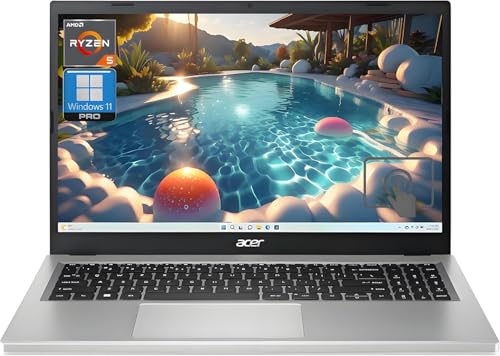
Not everyone needs or wants to spend+ on a laptop. The ASUS VivoBook 15 with AMD Ryzen 5 gives you a capable everyday machine for. Battery life runs 8-10 hours under mixed use, the keyboard is comfortable for long typing sessions, and the 15.6-inch display is easy on the eyes. It won't impress a creative pro, but it covers the bases for students and remote workers who mainly live in a browser.
Before you buy
Processor
For everyday use, any modern chip. Apple M-series, Intel Core Ultra, or AMD Ryzen 5/7. is fast enough. Avoid anything labeled "Celeron" or "Pentium" for anything beyond very light browsing.
RAM
16GB is the minimum worth buying in 2026. 8GB systems will feel sluggish within a year or two as apps grow.
Storage type
SSD over HDD. always. The performance difference is night and day. Aim for at least 256GB; 512GB gives you comfortable headroom.
Ports
Check that the machine has the connections you need before buying. USB-A ports are still common in peripherals; USB-C/Thunderbolt is faster for external drives and displays.
Form factor
Desktop or laptop? Desktops typically offer more power per dollar and last longer. Laptops give you flexibility. Don't compromise on the wrong thing.
Operating system
macOS and Windows both work well in 2026. The choice often comes down to what software you already use and whether you're invested in Apple's ecosystem.
The wrap-up
The right computer is the one that matches your actual workload and budget. For most home and office users, the Apple Mac mini M4 is the standout recommendation. it's fast, quiet, and affordable. Windows users should look at the Dell XPS Desktop for flexibility. Students and travelers should strongly consider the MacBook Air M4. Whatever you choose, prioritize SSD storage and at least 16GB of RAM to stay future-proof
Quick answers
The Apple Mac mini M4 or a mid-range Windows desktop like the Dell XPS cover everyday tasks like browsing, streaming, and light productivity with ease.
A laptop like the MacBook Air M4 or a Windows laptop with an AMD Ryzen 7 chip offers the portability students need without sacrificing performance.
Yes. For browsing, streaming, office apps, and light photo editing, 16GB is more than sufficient for the vast majority of users.
The Lenovo IdeaCentre line offers solid everyday performance making it a strong choice for budget-conscious buyers.

Tom Reeves has reviewed consumer electronics for over a decade, with a focus on televisions, monitors, laptops, and smart home devices. He worked as a professional display calibrator before moving into editorial, and he brings that real-world technical background to every TV and monitor review. At TheTestedHub, Tom covers display calibration, computer monitors, laptops and 2-in-1s, smart home platforms, home theater setups, and HDR performance.
More to explore

5 Best Computers for Unity 2026 | Top Picks for Game Development

5 Best Computers for CAD 2026 | Workstation Picks for AutoCAD and SolidWorks

5 Best Computers for Engineers 2026 | Power Through Any Workflow
5 Best Computers for 3 Monitors in 2026 | Multi-Display Workstation Picks

5 Best Computers for Hacking 2026 | Top Picks for Security Work

5 Best Computers for Photos 2026 | Organize, Edit, and Store Faster
5 Best Computers for Adobe CC 2026 | Creative Cloud Performance Picks