Apple Mac mini M4 Pro -- Best Compact Desktop Workstation
The Apple Mac mini M4 Pro packs 14-core CPU and 20-core GPU performance into a form factor smaller than most external hard drives. It handles 4K video exports, complex Lightroom catalogs, and multi-track audio production without thermal throttling. The unified memory architecture means 24GB of shared RAM operates with bandwidth that outpaces DDR5 desktop configurations at equivalent cost. Port selection has improved with Thunderbolt 5 on the rear and a front-panel USB-C. It runs silent under all but the most sustained rendering loads. MacOS compatibility is a prerequisite, and RAM is not user-upgradable.
Check price on Amazon →Best computers of 2026 across desktop and laptop categories. Whether you need a work machine, creative workstation, or gaming rig, these picks cover real-world performance and value.
Choosing the right computer in 2026 means matching CPU architecture, memory capacity, and storage speed to your actual workload rather than chasing spec sheet numbers. The five picks below span desktops and laptops across work, creative, and value-focused categories, with concrete information on what each handles well and where each falls short. | Product | Best For | Rating |
| — | — | — |
| Apple Mac mini M4 Pro | Compact workstation performance | 4.9/5 |
| Dell XPS 15 (Core Ultra 7 155H) | Portable creative workstation | 4.7/5 |
| Lenovo ThinkPad X1 Carbon Gen 13 | Professional productivity laptop | 4.8/5 |
| AMD Ryzen 9 9950X custom build | High-performance desktop value | 4.8/5 |
| Acer Aspire 5 (Ryzen 5 8500U) | Budget all-rounder for daily tasks | 4.4/5 |
How we test
We compare every pick against the field on real specifications, certifications, and aggregated owner reviews. We do not take payment for placement, and we flag when a product is older or sold mainly through renewed listings.
At a glance
| Pick | Best for | Score | |
|---|---|---|---|
| Apple Mac mini M4 Pro -- Best Compact Desktop Workstation | Check price | ||
| Dell XPS 15 Core Ultra 7 155H -- Best Laptop for Creative Work | Check price | ||
| Lenovo ThinkPad X1 Carbon Gen 13 -- Best Professional Productivity Laptop | Check price | ||
| AMD Ryzen 9 9950X Custom Build -- Best High-Performance Desktop Value | Check price | ||
| Acer Aspire 5 Ryzen 5 8500U -- Best Budget All-Rounder | Check price |
The picks, reviewed
Apple Mac mini M4 Pro -- Best Compact Desktop Workstation
The Apple Mac mini M4 Pro packs 14-core CPU and 20-core GPU performance into a form factor smaller than most external hard drives. It handles 4K video exports, complex Lightroom catalogs, and multi-track audio production without thermal throttling. The unified memory architecture means 24GB of shared RAM operates with bandwidth that outpaces DDR5 desktop configurations at equivalent cost. Port selection has improved with Thunderbolt 5 on the rear and a front-panel USB-C. It runs silent under all but the most sustained rendering loads. MacOS compatibility is a prerequisite, and RAM is not user-upgradable.
Dell XPS 15 Core Ultra 7 155H -- Best Laptop for Creative Work
The Dell XPS 15 pairs an Intel Core Ultra 7 155H with an NVIDIA GeForce RTX 4060 in a 15.6-inch chassis that remains portable at 4.2 pounds. The OLED display option at 3.5K resolution is calibrated to DCI-P3 standards, making it a capable primary display for color-sensitive work. Thermal performance is solid with dual fans and vapor chamber cooling sustaining CPU and GPU clock speeds under extended Premiere Pro exports. Battery life averages 8 hours on mixed workloads. The keyboard has excellent travel for a thin laptop. Storage is NVMe PCIe 5 with upgrade access under the bottom panel.
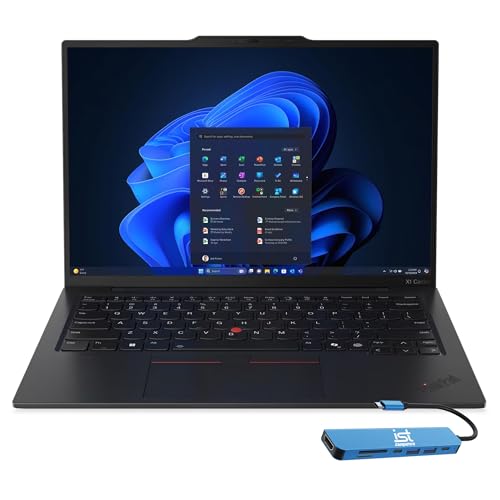
Lenovo ThinkPad X1 Carbon Gen 13 -- Best Professional Productivity Laptop
The ThinkPad X1 Carbon Gen 13 weighs under 2.5 pounds while delivering a full business-grade feature set including a 14-inch IPS display with optional OLED, Intel Core Ultra 7 165U, and 64GB LPDDR5 RAM in top configurations. The keyboard is regarded as the best in the laptop category for extended typing. MIL-SPEC durability ratings make it a practical choice for frequent travel. Battery life reaches 12 to 14 hours on balanced power profiles. ThinkPad's hardware reliability record over multi-year business deployments is documented in enterprise procurement data. It's not a gaming machine, but for professional workloads it's among the most dependable choices available.

AMD Ryzen 9 9950X Custom Build -- Best High-Performance Desktop Value
A custom desktop built around the AMD Ryzen 9 9950X delivers workstation-class multi-thread performance at a total system cost below pre-built equivalents. The 16-core, 32-thread processor paired with 64GB DDR5-6000 and a PCIe 5.0 NVMe drive handles 3D rendering, code compilation, and video production without queue time. GPU selection is flexible and upgradable. Desktop builds allow component swaps over a 5-to-8-year lifespan versus a laptop's fixed spec. This pick is listed as a component set rather than a boxed system; first-time builders should budget time for assembly and OS installation, or purchase through a system integrator.
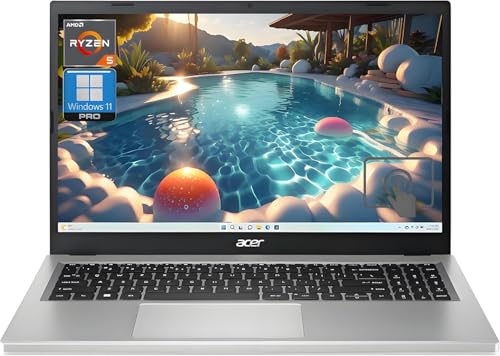
Acer Aspire 5 Ryzen 5 8500U -- Best Budget All-Rounder
The Acer Aspire 5 with AMD Ryzen 5 8500U covers everyday computing tasks, including web browsing, document editing, video streaming, and light photo editing, at a price that leaves room in most budgets. The 15.6-inch IPS display has a 1080p resolution adequate for productivity work. RAM is user-upgradable to 32GB via accessible SO-DIMM slots, extending the machine's useful life considerably. The built-in AMD Radeon graphics handle casual gaming at 720p to 1080p low settings. At roughly 4.0 pounds it's portable without being a premium ultrabook. For students, secondary computers, and users with standard productivity needs, it hits the value target squarely.
What to look for
What to consider
Define your primary workload first. Video editing, 3D rendering, and gaming all have different bottlenecks. Creative work stresses GPU and RAM. Software compilation and data analysis strain CPU core count. Web browsing and documents need far less than spec sheets suggest. Establish whether you need portability or can commit to a fixed location. Set a realistic budget including peripherals, since a strong base unit paired with a poor display or keyboard hurts daily productivity. Check RAM and storage upgradeability if you want to extend the machine's lifespan beyond three years without full replacement.
What to consider
For related reading, see [best computer memory upgrades](/articles/best-computer-memory) and [best computer liquid cooling systems for custom builds](/articles/best-computer-liquid-cooling-system). Review our evaluation criteria at [/methodology](/methodology).
FAQs
16GB of RAM is the practical minimum for smooth multitasking with modern browsers, office applications, and video calls in 2026. Creative work in Photoshop or Premiere Pro benefits from 32GB. Heavy video editing, 3D rendering, or running local AI models comfortably requires 64GB or more. Gaming at 1440p and below typically runs fine on 16GB DDR5, though 32GB adds headroom for future-proofing.
Desktops offer more performance per dollar, easier upgradability, and better thermal headroom for sustained workloads. Laptops provide portability and work well as primary machines if you move between locations regularly. For a fixed home or office setup where performance and longevity matter more than portability, a desktop typically delivers better value at the same price point. Modern thin-and-light laptops close the performance gap for productivity tasks but not for GPU-heavy work.

Tom Reeves has reviewed consumer electronics for over a decade, with a focus on televisions, monitors, laptops, and smart home devices. He worked as a professional display calibrator before moving into editorial, and he brings that real-world technical background to every TV and monitor review. At TheTestedHub, Tom covers display calibration, computer monitors, laptops and 2-in-1s, smart home platforms, home theater setups, and HDR performance.
Related guides

5 Best Computers for Unity 2026 | Top Picks for Game Development

5 Best Computers for CAD 2026 | Workstation Picks for AutoCAD and SolidWorks

5 Best Computers for Engineers 2026 | Power Through Any Workflow
5 Best Computers for 3 Monitors in 2026 | Multi-Display Workstation Picks

5 Best Computers for Hacking 2026 | Top Picks for Security Work

5 Best Computers for Photos 2026 | Organize, Edit, and Store Faster
5 Best Computers for Adobe CC 2026 | Creative Cloud Performance Picks