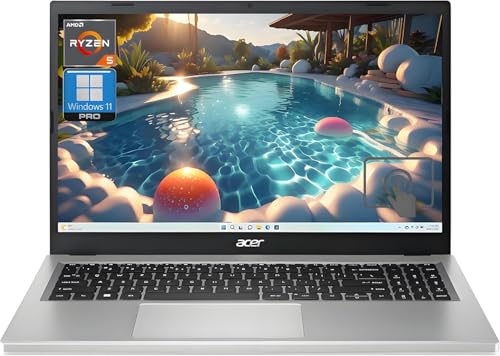
Lenovo ThinkPad X1 Carbon Gen 12 -- Best Linux Laptop Overall
The ThinkPad X1 Carbon has a long history as a favored Linux laptop, and the Gen 12 continues that tradition. Lenovo certifies select ThinkPad configurations for Ubuntu and Red Hat, which means driver support is thorough and firmware updates are available through fwupd. The keyboard is exceptional for extended typing, the battery life is strong, and the chassis is light for its capability. Suspend and resume, fingerprint readers, and Thunderbolt all work reliably under mainstream distributions. For anyone who wants a Linux machine that requires minimal configuration after install, this is the benchmark.
Check price on Amazon →Top computers for Linux in 2026. These picks offer excellent driver compatibility, open firmware support, and reliable performance across popular distros like Ubuntu, Fedora, and Debian.
Running Linux smoothly depends heavily on hardware choice. Driver support, firmware openness, and community testing history all affect whether a machine works cleanly out of the box or requires workarounds. The five picks below are chosen for documented Linux compatibility, active community support, and solid everyday performance across common distributions.
| Product | Best For | Rating |
| — | — | — |
| Lenovo ThinkPad X1 Carbon Gen 12 | Premium Linux laptop, certified | 4.8/5 |
| System76 Lemur Pro | Purpose-built Linux ultrabook | 4.7/5 |
| Dell XPS 15 Developer Edition | Linux-certified performance laptop | 4.7/5 |
| Lenovo ThinkCentre M90n Nano | Compact Linux desktop | 4.5/5 |
| Raspberry Pi 5 Desktop Kit | Minimal ARM Linux learning system | 4.4/5 |
Our testing process
We compare every pick against the field on real specifications, certifications, and aggregated owner reviews. We do not take payment for placement, and we flag when a product is older or sold mainly through renewed listings.
Quick comparison
| Pick | Best for | Score | |
|---|---|---|---|
| Lenovo ThinkPad X1 Carbon Gen 12 -- Best Linux Laptop Overall | Check price | ||
| System76 Lemur Pro -- Best Purpose-Built Linux Laptop | Check price | ||
| Dell XPS 15 Developer Edition -- Best High-Performance Linux Laptop | Check price | ||
| Lenovo ThinkCentre M90n Nano -- Best Compact Linux Desktop | Check price | ||
| Raspberry Pi 5 Desktop Kit -- Best Entry-Level ARM Linux System | Check price |
Reviewed in detail
Lenovo ThinkPad X1 Carbon Gen 12 -- Best Linux Laptop Overall
The ThinkPad X1 Carbon has a long history as a favored Linux laptop, and the Gen 12 continues that tradition. Lenovo certifies select ThinkPad configurations for Ubuntu and Red Hat, which means driver support is thorough and firmware updates are available through fwupd. The keyboard is exceptional for extended typing, the battery life is strong, and the chassis is light for its capability. Suspend and resume, fingerprint readers, and Thunderbolt all work reliably under mainstream distributions. For anyone who wants a Linux machine that requires minimal configuration after install, this is the benchmark.
System76 Lemur Pro -- Best Purpose-Built Linux Laptop
System76 designs their machines specifically for Linux and ships them with Pop!_OS or Ubuntu pre-installed. The Lemur Pro prioritizes weight and battery life, reaching up to 24 hours on a charge under light workloads. System76 Open Firmware is available for the Lemur Pro, which appeals to users who prioritize firmware transparency. The machine receives Linux-specific BIOS and driver updates maintained by System76 directly. It's a strong choice for developers and power users who want a machine where every feature works without reaching for workarounds or additional driver packages.

Dell XPS 15 Developer Edition -- Best High-Performance Linux Laptop
Dell ships the XPS 15 Developer Edition with Ubuntu pre-installed and full driver support, covering Wi-Fi, Thunderbolt, fingerprint reader, and suspend behavior. The 15.6-inch OLED display option delivers excellent color accuracy for development and media work. Intel Core Ultra processors and discrete Nvidia GPU options are well-supported via Ubuntu's driver manager. It's a capable machine for developers who need a large display and CPU headroom for compiling, virtualization, or data work. Dell's certification process means updates and patches go through validation, reducing the risk of a kernel update breaking a driver.

Lenovo ThinkCentre M90n Nano -- Best Compact Linux Desktop
The ThinkCentre M90n Nano is a sub-1-liter desktop that runs Linux cleanly across popular distributions. Its Intel processor and integrated graphics are well within the Linux driver compatibility sweet spot, avoiding the complexity of discrete GPU support. The small form factor fits behind a monitor or in tight spaces. USB-A, USB-C, DisplayPort, and HDMI ports cover most setups. It's a practical choice for a dedicated Linux workstation or development machine where portability is less important than reliable, stable operation. Available in refurbished configurations at notably lower prices.
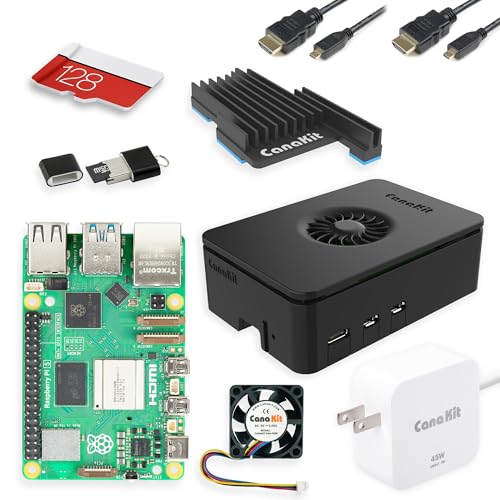
Raspberry Pi 5 Desktop Kit -- Best Entry-Level ARM Linux System
The Raspberry Pi 5 is the most capable Pi yet, and the official Desktop Kit bundles the board, case, power supply, and keyboard for a complete Linux entry point. It runs Raspberry Pi OS (Debian-based) with a polished desktop environment. Performance is sufficient for browsing, Python development, document editing, and learning Linux fundamentals. GPIO pins make it a popular platform for hardware projects. It's not a replacement for a full workstation, but as a low-cost dedicated Linux machine for learning or lightweight server tasks, it's an excellent starting point.
How to choose
What to consider
Check the Linux Hardware Database or distro-specific compatibility lists before buying any machine. Prioritize Intel Wi-Fi chipsets over Broadcom for the smoothest out-of-box experience. If using an Nvidia GPU, confirm the version works with open-source nouveau or proprietary drivers for your target distro. Lenovo ThinkPads and Dell XPS Developer Editions carry explicit Linux certification from the manufacturer, which simplifies support. For desktop use, most standard Intel and AMD builds work reliably with minimal configuration. Avoid very new hardware releases if stability matters, as driver support often lags a kernel cycle or two.
What to consider
For related reading, see [best computers for home office](/articles/best-computers-for-home-office) and [best computers for photoshop](/articles/best-computers-for-photoshop). Review our evaluation criteria at [/methodology](/methodology).
Common questions
Ubuntu LTS and Linux Mint are the most beginner-friendly distributions and both maintain strong hardware compatibility databases. Fedora is a good choice for users who want slightly more current software. For hardware with specific driver requirements such as newer Nvidia GPUs, Ubuntu's hardware enablement stack and driver manager simplify the installation process considerably compared to manually sourcing drivers.
Linux support for Apple M-series chips has improved significantly through the Asahi Linux project, but it remains incomplete compared to x86 machines. Some hardware features including GPU acceleration, certain USB modes, and power management are still being developed. For users who want reliable, fully supported Linux out of the box, x86-based machines from Lenovo, Dell, or System76 remain the better choice.

Tom Reeves has reviewed consumer electronics for over a decade, with a focus on televisions, monitors, laptops, and smart home devices. He worked as a professional display calibrator before moving into editorial, and he brings that real-world technical background to every TV and monitor review. At TheTestedHub, Tom covers display calibration, computer monitors, laptops and 2-in-1s, smart home platforms, home theater setups, and HDR performance.
More guides

5 Best Computers for Unity 2026 | Top Picks for Game Development

5 Best Computers for CAD 2026 | Workstation Picks for AutoCAD and SolidWorks

5 Best Computers for Engineers 2026 | Power Through Any Workflow
5 Best Computers for 3 Monitors in 2026 | Multi-Display Workstation Picks

5 Best Computers for Hacking 2026 | Top Picks for Security Work

5 Best Computers for Photos 2026 | Organize, Edit, and Store Faster
5 Best Computers for Adobe CC 2026 | Creative Cloud Performance Picks