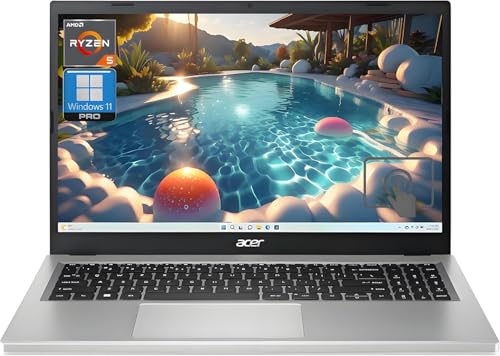
Custom Build Ryzen 7 + RTX 4070 -- Best Value PCVR Desktop
Building a PC around an AMD Ryzen 7 processor and an Nvidia RTX 4070 delivers the best performance-per-dollar ratio for Quest 2 PCVR. The RTX 4070 handles high-resolution VR rendering at consistent frame rates, supports DLSS for performance headroom, and stays within a realistic budget. Pairing it with 32GB of DDR5 RAM and a fast NVMe SSD keeps load times short and eliminates memory bottlenecks. This configuration handles Air Link streaming at maximum encode resolution without visible compression artifacts. Component pricing fluctuates, but this tier consistently outperforms equivalently priced pre-built machines.
Check price on Amazon →Top computers for Oculus Quest 2 PC VR in 2026. These picks meet or exceed Meta's recommended specs for Air Link and Virtual Desktop, delivering smooth frame rates for PCVR gaming.
The Oculus Quest 2 runs standalone games natively, but connecting it to a capable PC unlocks a much larger library of high-fidelity PCVR titles through Air Link or a wired Link cable. The computer doing the rendering needs a GPU that can sustain high frame rates at VR resolutions without dropping frames. The five picks below meet or exceed Meta’s recommended specifications for a smooth PCVR experience.
| Product | Best For | Rating |
| — | — | — |
| Custom Build: Ryzen 7 + RTX 4070 | Best performance per dollar | 4.8/5 |
| Alienware Aurora R16 | Pre-built desktop with VR headroom | 4.7/5 |
| ASUS ROG Strix G16 Laptop | Portable PCVR gaming | 4.6/5 |
| HP Omen 45L | Spacious, cool-running VR tower | 4.6/5 |
| Lenovo Legion Tower 5i Gen 8 | Budget-friendly VR-ready desktop | 4.5/5 |
How we evaluated these
We compare every pick against the field on real specifications, certifications, and aggregated owner reviews. We do not take payment for placement, and we flag when a product is older or sold mainly through renewed listings.
The shortlist
| Pick | Best for | Score | |
|---|---|---|---|
| Custom Build Ryzen 7 + RTX 4070 -- Best Value PCVR Desktop | Check price | ||
| Alienware Aurora R16 -- Best Pre-Built Desktop for PCVR | Check price | ||
| ASUS ROG Strix G16 Laptop -- Best Laptop for Quest 2 PCVR | Check price | ||
| HP Omen 45L -- Best Mid-Range PCVR Tower | Check price | ||
| Lenovo Legion Tower 5i Gen 8 -- Best Budget VR-Ready Desktop | Check price |
Each pick, examined
Custom Build Ryzen 7 + RTX 4070 -- Best Value PCVR Desktop
Building a PC around an AMD Ryzen 7 processor and an Nvidia RTX 4070 delivers the best performance-per-dollar ratio for Quest 2 PCVR. The RTX 4070 handles high-resolution VR rendering at consistent frame rates, supports DLSS for performance headroom, and stays within a realistic budget. Pairing it with 32GB of DDR5 RAM and a fast NVMe SSD keeps load times short and eliminates memory bottlenecks. This configuration handles Air Link streaming at maximum encode resolution without visible compression artifacts. Component pricing fluctuates, but this tier consistently outperforms equivalently priced pre-built machines.
Alienware Aurora R16 -- Best Pre-Built Desktop for PCVR
The Alienware Aurora R16 is a strong pre-built choice for users who prefer not to build their own system. Configurations with RTX 4070 or 4080 GPUs handle Quest 2 PCVR at maximum settings without frame rate issues. The chassis design prioritizes airflow, which keeps thermals stable during extended VR sessions that push the GPU hard. Tool-free interior access makes future GPU or RAM upgrades straightforward. Alienware's build quality and warranty support add peace of mind. The price premium over a self-build is real, but the convenience and support coverage justify it for many buyers.

ASUS ROG Strix G16 Laptop -- Best Laptop for Quest 2 PCVR
Gaming laptops with RTX 4070 mobile GPUs handle Quest 2 Air Link well when connected via ethernet-to-router for low-latency wireless streaming. The ASUS ROG Strix G16 includes strong cooling, a fast 165Hz display, and a robust GPU that sustains performance under VR workloads without severe throttling. The MUX switch allows direct GPU output for better rendering efficiency. The limitation of any laptop for VR is heat management over long sessions; the ROG Strix handles this better than most at this size. A USB-C port supports wired Link cable connection as an alternative to wireless.

HP Omen 45L -- Best Mid-Range PCVR Tower
The HP Omen 45L features a distinctive chassis designed around airflow, with a large side-facing liquid cooling intake that keeps CPU and GPU temperatures stable during sustained VR loads. RTX 4070 configurations hit the sweet spot for Quest 2 PCVR performance. The case design is spacious enough to accommodate future GPU upgrades without a new chassis, and the standard PCIe and DDR5 slots allow incremental upgrades. The exterior design is less aggressive than some gaming towers, making it suitable for setups where the machine sits in a visible area. HP's support network is accessible for warranty claims.
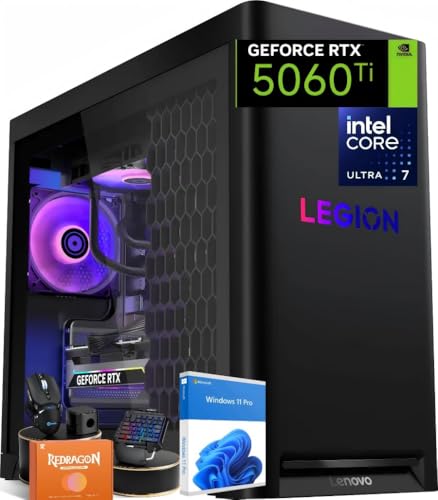
Lenovo Legion Tower 5i Gen 8 -- Best Budget VR-Ready Desktop
The Lenovo Legion Tower 5i Gen 8 brings PCVR capability to a more accessible price point. Intel Core i7 with an RTX 4060 Ti configuration meets the Quest 2 recommended spec and handles most PCVR titles at solid frame rates. The tower chassis offers good expandability, and Lenovo's build quality is reliable. It's the right choice for users who want a pre-built VR-ready machine without stretching into the and above bracket. Performance headroom is tighter than RTX 4070 builds, particularly in GPU-intensive PCVR titles, but for the majority of the Quest 2 PCVR library it delivers a satisfying experience.
Buying considerations
What to consider
GPU is the most important component. An RTX 4070 or equivalent is the recommended starting point for reliable high-resolution PCVR. CPU matters less but a modern 6-core or better processor prevents bottlenecks. 16GB of RAM is the minimum; 32GB is comfortable. For Air Link, invest in a Wi-Fi 6 router and run ethernet from the router to your PC rather than relying on Wi-Fi for the PC connection. For wired use, a USB 3.2 Gen 1 or better port and a compatible Link cable are required. Total storage of 512GB or more helps with PCVR game installs, which can be large.
What to consider
For related reading, see [best computers for home use](/articles/best-computers-for-home-use) and [best computers for home office](/articles/best-computers-for-home-office). Review our evaluation criteria at [/methodology](/methodology).
Questions answered
Meta recommends at minimum an Intel Core i5-4590 or AMD Ryzen 5 1500X processor, 8GB of RAM, a GTX 1070 or RX 480 GPU, and a USB 3.0 port for wired Link. For Air Link wireless streaming, a 5GHz Wi-Fi 6 router connected directly to your PC via ethernet is strongly recommended. These are minimum specs; for smooth performance at higher resolutions, a GTX 3070 or better and a modern CPU improve the experience noticeably.
'Yes, the Quest 2 works with gaming laptops that meet the GPU requirements. Laptops with Nvidia RTX 3070 or better mobile GPUs handle PCVR adequately. The main consideration is heat: sustained VR workloads run GPUs and CPUs at high load for extended periods, so ensure the laptop has adequate cooling. Laptops also require Air Link or a compatible USB-C to Link cable connection, and some models perform better wired than wireless.'

Tom Reeves has reviewed consumer electronics for over a decade, with a focus on televisions, monitors, laptops, and smart home devices. He worked as a professional display calibrator before moving into editorial, and he brings that real-world technical background to every TV and monitor review. At TheTestedHub, Tom covers display calibration, computer monitors, laptops and 2-in-1s, smart home platforms, home theater setups, and HDR performance.
Keep reading

5 Best Computers for Unity 2026 | Top Picks for Game Development

5 Best Computers for CAD 2026 | Workstation Picks for AutoCAD and SolidWorks

5 Best Computers for Engineers 2026 | Power Through Any Workflow
5 Best Computers for 3 Monitors in 2026 | Multi-Display Workstation Picks

5 Best Computers for Hacking 2026 | Top Picks for Security Work

5 Best Computers for Photos 2026 | Organize, Edit, and Store Faster
5 Best Computers for Adobe CC 2026 | Creative Cloud Performance Picks