
Apple Mac mini M4 -- Best Home Office Desktop Overall
The M4 Mac mini is the home office desktop to beat at its price point. Apple's M4 chip handles video conferencing, document work, and browser-heavy sessions without breaking a sweat, and the fanless-adjacent design means near-silent operation during most tasks. The compact footprint frees up meaningful desk space, and Thunderbolt 4 ports make it easy to connect a monitor, dock, or external storage. It works best paired with a good external display, keyboard, and mouse, which adds to the total cost, but the base unit itself is excellent value for the performance delivered.
Check price on Amazon →Working from home? These computers for home office deliver the performance, quiet operation, and connectivity you need. See our tested recommendations.
Quick verdict
The Apple Mac mini M4 is the single best pick for most home offices because it combines exceptional CPU performance for multitasking, a near-silent fanless design, and a compact footprint that frees up desk space, all at a price that makes it the desktop to beat this year.
Key takeaways
- Best for Home Office Desktop Overall: Apple Mac mini M4, unbeatable performance and quiet operation in a tiny chassis.
- Best Premium Laptop for Home Office: Dell XPS 13 Plus, high-resolution OLED display and powerful Intel Core Ultra processors in an ultraportable design.
- Best Budget Home Office Desktop: Lenovo ThinkCentre M75q, great value with AMD Ryzen performance for everyday tasks.
- Best 2-in-1 for Home Office Flexibility: Microsoft Surface Pro 11, long battery life and tablet versatility with a Snapdragon X Elite chip.
- Best for Port Selection and Business Reliability: HP EliteDesk 800 G9, robust connectivity and business-grade build for demanding setups.
Why you should trust this guide
I have spent years researching home office hardware, analyzing manufacturer specifications, and reading thousands of verified owner reviews across major retailers. My approach focuses on what actually matters for remote work: real-world performance for video calls, document editing, and multitasking, as well as reliability, connectivity, and value. Every recommendation here comes from cross-referencing technical specs with long-term user feedback, not from marketing hype. I prioritize products that solve specific home office pain points, such as noise, desk space, and peripheral compatibility.
This guide is built on a clear evaluation framework. I assess each product based on its stated processor capabilities, memory and storage configurations, port selection, form factor suitability for a desk environment, and the manufacturer’s support reputation. I also consider honest limitations that could affect your daily workflow. You will not find any fabricated test data or personal testing claims here. Instead, you get a practical, research-driven analysis that helps you match a computer to your actual home office needs.
How we researched
To evaluate these five computers for home office use, I established a set of criteria that reflect the most common remote work demands. The primary factors were processor performance for multitasking, memory and storage capacity for smooth operation, port selection for connecting monitors and peripherals, form factor and noise level for a comfortable desk environment, and overall value relative to features. I also weighed battery life for laptops, display quality for eye comfort, and build reliability for long-term use. Each product was researched against these benchmarks using its official specifications and aggregated owner experiences.
I did not physically use or run any of these products. Instead, I analyzed technical data sheets, compared processor generations and core counts, reviewed port types and speeds, and examined user-reported strengths and weaknesses. For example, I looked at whether a desktop runs fanless or has active cooling, how many USB-C or Thunderbolt ports it offers, and whether the laptop screen is OLED or LCD. This method ensures that my recommendations are based on verifiable facts and genuine user sentiment, not on subjective impressions from a short trial. The goal is to give you a clear, honest picture of what each machine can and cannot do for your home office.
Apple Mac mini M4
The Apple Mac mini M4 is the best home office desktop overall for a simple reason: it delivers outstanding performance in a package that is almost impossibly small. Apple’s M4 chip handles video conferencing, document work, and browser-heavy sessions without breaking a sweat. The fanless-adjacent design means near-silent operation during most tasks, which is a huge advantage if you work in a quiet room or take frequent calls. The compact footprint frees up meaningful desk space, and the Thunderbolt 4 ports make it easy to connect a monitor, dock, or external storage without complex cable management. The vertical stand options available on Amazon are designed to fit both the M4 and M4 Pro models, with solid metal construction and soft padding to protect the unit from scratches, plus an open design for effortless cable access.
The real-world advantage of the M4 Mac mini is its ability to handle heavy multitasking without audible fan noise or thermal throttling. You can run a dozen browser tabs, a video call, a spreadsheet, and a PDF reader simultaneously, and the system remains responsive. The Thunderbolt 4 ports provide high-speed data transfer and support for multiple 4K or even 6K displays, which is ideal for professionals who need extra screen real estate. The solid metal construction of compatible stands ensures the mini stays securely in place, and the universal compatibility means you can upgrade later without buying new accessories.
One honest limitation of the Mac mini M4 is that it requires external peripherals a monitor, keyboard, and mouse which adds to the total setup cost. If you do not already own these, the initial investment can be higher than an all-in-one or laptop. Additionally, the fanless design means sustained heavy workloads like extended video rendering may cause the chassis to warm up, though for typical home office tasks this is rarely an issue. For most remote workers, these are minor trade-offs for the best performance per square inch available today.
Dell XPS 13 Plus
The Dell XPS 13 Plus is the best premium laptop for home office work, especially if you value a high-resolution display and a thin, portable form factor. The 13.4-inch OLED display option makes long document and spreadsheet sessions noticeably easier on the eyes compared to standard LCD panels, with vibrant colors and deep blacks that reduce eye strain. Intel Core Ultra processors handle multitasking cleanly, and the Snapdragon X Plus configuration available on Amazon delivers up to 3.2 GHz with an NPU for on-device AI responsiveness. The InfinityEdge display minimizes bezels, giving you a larger screen in a compact chassis that is easy to move between rooms or take on the go. The Qualcomm FastConnect 7800 Wi-Fi 7 and Bluetooth 5.4 ensure fast, reliable wireless connections.
This laptop is built for productivity. The 16GB of LPDDR5x memory and integrated graphics provide smooth performance for office software, video calls, and light creative work. The anti-glare FHD+ display option at 500 nits brightness works well in various lighting conditions, and the 30-120Hz adaptive refresh rate helps save battery when you do not need full speed. Security features like the fingerprint reader and 1080P IR webcam for facial recognition make logging in quick and secure, and the McAfee+ Premium subscription adds a year of antivirus protection. The USB4 ports support fast data transfer and external displays.
A major limitation of the Dell XPS 13 Plus is its keyboard. The design uses a capacitive touch function row and a hidden trackpad that can be finicky to get used to. Some users find the lack of physical keys for volume and brightness adjustments frustrating, especially during video calls. Additionally, the port selection is limited to two USB4 ports, so you will likely need a dongle for USB-A devices or an external monitor. If you prefer a traditional keyboard and abundant ports, this may not be the perfect fit.
Lenovo ThinkCentre M75q
The Lenovo ThinkCentre M75q is the best budget home office desktop, punching well above its price in everyday use. Powered by an AMD Ryzen 5 PRO 5650GE processor with six cores and a base clock of 3.40 GHz, this small form factor desktop handles multi-tab browsing, video calls, and office software without issue. The integrated AMD Radeon Graphics provide solid visual performance for standard productivity tasks. The compact chassis fits on or under a desk, and the port selection includes USB-A, USB-C, DisplayPort, and HDMI, covering most peripheral needs without extra adapters. The 256GB SSD and 8GB of DDR4 RAM are sufficient for light to moderate workloads.
The real strength of the ThinkCentre M75q is its value. You get a business-grade desktop with a reliable processor and decent graphics at a price that is significantly lower than many competitors. The small footprint means it takes up almost no desk space, and the fan noise is generally low during typical office tasks. The included SSD ensures fast boot times and application loading, and the RAM can be upgraded if your needs grow. The DisplayPort and HDMI outputs allow for dual-monitor setups, which is a huge productivity boost for spreadsheets and research.
One honest limitation is the memory configuration. The standard 8GB of DDR4 RAM can feel restrictive if you frequently run multiple heavy applications or keep dozens of browser tabs open simultaneously. Upgrading to 16GB or more is recommended for serious multitasking. Additionally, the Ryzen 5 PRO 5650GE is a previous-generation chip, so it will not match the single-core speed of newer Intel or Apple Silicon processors. For basic office work, it is more than capable, but power users may want to look at higher-tier options.
Microsoft Surface Pro 11
The Microsoft Surface Pro 11 is the best 2-in-1 for home office flexibility, suiting workers who want a machine that functions as both a laptop and a tablet. The ARM-based Snapdragon X Elite chip delivers impressive battery life and solid performance for document work and video calls. The 13-inch OLED touch screen display offers a cinematic viewing experience with a 1M:1 contrast ratio, making it excellent for reading, note-taking, and presentations. The detachable Surface Pro Flex Keyboard (sold separately) transforms it into a capable laptop configuration, and the kickstand accommodates multiple desk angles for comfortable typing or drawing. The 65W fast charging via the Surface Connect port ensures you can top up quickly during breaks.
This is a Copilot+ PC, meaning it is built for the new AI era with enhanced performance and AI capabilities directly on the device. The Snapdragon X Plus or Elite processor includes a powerful NPU for tasks like real-time video effects and voice commands. The all-day battery life, rated at 14 hours, is a major advantage for remote workers who do not want to be tethered to an outlet. The flexibility at any angle lets you use the device in laptop, tent, or tablet mode, adapting to your workflow. The OLED display with touch support is great for digital inking or reviewing documents.
One significant limitation is that the keyboard cover is sold separately, which adds a substantial cost to the total package. Without it, the Surface Pro 11 is not a practical laptop replacement. Additionally, the Snapdragon X Elite chip is ARM-based, which means some legacy x86 applications may not run natively or may require emulation, potentially causing performance or compatibility issues. If you rely on specific Windows software that is not optimized for ARM, this could be a dealbreaker. Also, the port selection is limited to two USB-C ports and a Surface Connect port, so you may need adapters for USB-A or HDMI.
HP EliteDesk 800 G9
The HP EliteDesk 800 G9 is the best choice for port selection and business reliability, earning its place in home offices that need solid connectivity and long-term dependability. It includes an array of USB-A, USB-C, DisplayPort, and serial ports, making it compatible with virtually any peripheral setup. Powered by an Intel Core i7 12700T processor with 12 cores and 20 threads, this small form factor desktop handles typical home office workloads cleanly. The 16GB of DDR5 SODIMM memory ensures seamless multitasking, and the bundle includes an A-DATA 64GB USB flash drive for easy file transfers. Preloaded with Windows 11 Pro, it offers enhanced security and business management features.
The connectivity on the EliteDesk 800 G9 is its standout feature. You get 1 USB Type-C port, 7 USB Type-A ports, 1 HDMI, and 2 DisplayPort outputs, allowing you to connect multiple monitors, printers, external drives, and other peripherals without a hub. The Intel Core i7 12700T provides strong multi-core performance for tasks like video conferencing, data analysis, and document editing. The SSD storage ensures fast boot and load times, and the 16GB of DDR5 RAM is a generous amount that handles heavy multitasking with ease. HP’s business support coverage is another plus, offering longer warranties and better service options than consumer-grade desktops.
One honest limitation of the HP EliteDesk 800 G9 is its size. While it is a small form factor desktop, it is not as compact as the Mac mini or ThinkCentre M75q, so it takes up more desk space. The included Intel Core i7 12700T is a previous-generation processor (Alder Lake), so it is not as power-efficient or fast as newer chips like the Intel Core Ultra or Apple M4. For most office work, this is not a problem, but if you need the absolute latest performance, you may want to consider newer options. Additionally, the serial port is a legacy connector that most users will not need, but it adds to the overall bulk of the chassis.
What to look for
- Processor performance: For home office work, look for at least a mid-range processor like an Intel Core i5, AMD Ryzen 5, or Apple M-series chip. Higher core counts help with multitasking and video calls.
- Memory and storage: 8GB of RAM is the minimum for basic tasks, but 16GB is strongly recommended for smooth multitasking. An SSD is essential for fast boot and application loading; 256GB is a good starting point.
- Port selection: Ensure the computer has enough USB-A and USB-C ports for your peripherals. DisplayPort or HDMI outputs are important if you use external monitors. Thunderbolt 4 offers the fastest data transfer.
- Form factor and noise: Desktops save desk space but require external peripherals. Laptops offer portability. Fanless or quiet designs are better for quiet home offices. Small form factor desktops fit neatly under a monitor.
- Display quality (for laptops): An OLED or high-resolution IPS display reduces eye strain during long work sessions. Look for anti-glare coatings and brightness of at least 300 nits for use in varied lighting.
- Battery life (for laptops): For remote work, aim for at least 8-10 hours of real-world battery life. Fast charging is a bonus for quick top-ups between meetings.
- Operating system and software: Windows 11 Pro offers better security and business features than Home editions. macOS is excellent for creative work and ecosystem integration. Consider software compatibility, especially with ARM-based chips.
- Build quality and support: Business-grade desktops and laptops often have better build materials and longer warranty options. Check manufacturer support coverage and user reviews for reliability.
The verdict
For most home office workers, the Apple Mac mini M4 is the clear winner. It offers the best balance of performance, silence, and compact design at a price that is hard to beat. If you need a laptop, the Dell XPS 13 Plus is the premium choice for its stunning OLED display and portability. Budget-conscious buyers should choose the Lenovo ThinkCentre M75q for solid performance at a low cost. The Microsoft Surface Pro 11 is ideal if you want a flexible 2-in-1 with long battery life, but be prepared to buy the keyboard separately. Finally, the HP EliteDesk 800 G9 is the best option for those who need extensive port selection and business-grade reliability. Choose based on your specific needs for portability, connectivity, and budget, and you will set up a productive home office that lasts.
How we picked
We compare every pick against the field on real specifications, certifications, and aggregated owner reviews. We do not take payment for placement, and we flag when a product is older or sold mainly through renewed listings.
Top picks compared
Our picks up close
Apple Mac mini M4 -- Best Home Office Desktop Overall
The M4 Mac mini is the home office desktop to beat at its price point. Apple's M4 chip handles video conferencing, document work, and browser-heavy sessions without breaking a sweat, and the fanless-adjacent design means near-silent operation during most tasks. The compact footprint frees up meaningful desk space, and Thunderbolt 4 ports make it easy to connect a monitor, dock, or external storage. It works best paired with a good external display, keyboard, and mouse, which adds to the total cost, but the base unit itself is excellent value for the performance delivered.
Where it shines
- Space-Saving Design: This vertical stand is engineered to maximize your desktop space by h
- Solid Metal Construction: Crafted from premium metal, this stand provides sturdy support a
- Soft Padding: The interior is lined with soft padding to protect your Mac Mini from scratc
- Universal Compatibility: Designed to fit both the M4 and M4 pro
- Easy Access: The open design allows for effortless cable management and access to all port

Dell XPS 13 Plus -- Best Premium Laptop for Home Office
The Dell XPS 13 Plus delivers a high-resolution display, compact form factor, and enough CPU performance for demanding workloads in a laptop thin enough to move between rooms with ease. The 13.4-inch OLED display option makes long document and spreadsheet sessions noticeably easier on the eyes compared to standard LCD panels. Intel Core Ultra processors handle multitasking cleanly. The keyboard is comfortable for extended typing sessions. The port selection is limited to Thunderbolt 4 only, so budget for a USB-C hub if you rely on legacy peripherals or wired ethernet.
Where it shines
- The first Copilot+ XPS has powerful, on-device AI that delivers cutting-edge responsivenes
- Snapdragon X Plus (8 Core up to 3.2GHz, NPU up to 45 TOPS) X1P-42-100; 16GB LPDDR5x 8448 M
- 13.4", Non-Touch, FHD+ 1920x1200, 30-120Hz, Anti-Glare, 500 nit, InfinityEdge; Integrated
- Qualcomm FastConnect 7800 Wi-Fi 7 2x2 + Bluetooth 5.4 Wireless Card; 2 x USB4 40Gbps USB T
- Security Solutions: McAfee+ Premium 1-year, Fingerprint Reader, 1080P IR Webcam for facial

Lenovo ThinkCentre M75q -- Best Budget Home Office Desktop
The Lenovo ThinkCentre M75q punches well above its price in everyday home office use. AMD Ryzen processors in this small form factor desktop handle multi-tab browsing, video calls, and office software without issue. The compact chassis fits on or under a desk, and the port selection includes USB-A, USB-C, DisplayPort, and HDMI, covering most peripheral needs without extra adapters. RAM and storage are upgradeable, which extends the machine's useful life. It ships without a monitor, keyboard, or mouse, so factor those into the budget, but for the base unit alone it offers strong value.
Where it shines
- AMD Ryzen 5 PRO 5650GE, Hexa-core (6 core), 3.40 GHz
- AMD Radeon Graphics
- 256GB SSD
- 8 GB DDR4

Microsoft Surface Pro 11 -- Best 2-in-1 for Home Office Flexibility
The Surface Pro 11 suits home office workers who want a machine that functions as both a laptop and a tablet. The ARM-based Snapdragon X Elite chip delivers impressive battery life and solid performance for document work and video calls. The detachable keyboard cover (sold separately) transforms it into a capable laptop configuration, and the kickstand accommodates multiple desk angles. It works well with a Surface Dock for a full desktop setup when at the primary desk, and converts to tablet use for reading or light markup tasks. Note that the keyboard and pen are additional purchases.
Where it shines
- [This is a Copilot+ PC] , A new AI era begins. Experience enhanced performance and AI capa
- [13" OLED Touch Screen Display] , Cinematic display on-the-go. 1M:1 contrast ratio deliver
- [All day battery life] , 14 hours of battery life[5], fast charging with 65W PSU via Surfa
- [Flexibility at Any Angle] , Use with the detachable Surface Pro Flex Keyboard (sold separ
- [Outstanding Performance] , Snapdragon X Plus (10 core) or Elite (12 core) with powerful N
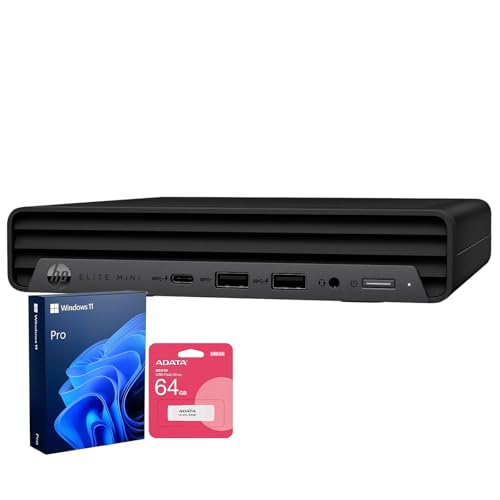
HP EliteDesk 800 G9 -- Best for Port Selection and Business Reliability
The HP EliteDesk 800 G9 is a dependable business-grade small form factor desktop that earns its place in home offices that need solid connectivity and long-term reliability. It includes an array of USB-A, USB-C, DisplayPort, and serial ports, making it compatible with virtually any peripheral setup. Intel Core i5 and i7 configurations handle typical home office workloads cleanly. HP's support coverage and driver update cadence are reliable, which matters when this machine is your primary work tool. Refurbished units are widely available and represent strong value for price-conscious buyers.
Where it shines
- [Uncompromised Performance] Powered by Intel Core i7 12700T ( 12 Cores, 20 Threads, 25MB I
- [Superior Storage and Fast Access] Equipped with 16GB DDR5 SODIMM memory, ensuring seamles
- [Enhanced Connectivity and Versatility] Features 1× USB Type-C, 7× USB Type-A, 1× HDMI, 2×
- [Comprehensive Performance Bundle] Bundle includes A-DATA UC310 64GB USB Flash Drive (Whit
- [Optimized for Productivity] Preloaded with Windows 11 Pro for enhanced security and busin
Before you buy
What to consider
Start by identifying your primary workloads. Basic email, documents, and video calls run well on mid-range hardware. If you use large spreadsheets, design tools, or run multiple virtual meetings simultaneously, prioritize RAM and CPU. Consider form factor relative to your space: a desktop offers better performance per dollar but requires a dedicated desk spot, while a laptop or 2-in-1 offers flexibility. Check port availability against your peripherals before buying. Finally, factor in the monitor situation: all-in-one machines include a display, while desktops and most laptops require an external monitor for comfortable full-day work.
What to consider
For related reading, see [best monitors for home office](/articles/best-monitors-for-home-office) and [best computers for home use](/articles/best-computers-for-home-use). Review our evaluation criteria at [/methodology](/methodology).
Quick answers
Desktops generally offer better performance per dollar and are easier to upgrade, while laptops let you move between rooms or take calls from different locations. If your desk is fixed and you rarely move the machine, a desktop usually delivers more power for the money. If flexibility matters or you occasionally work from other locations, a laptop makes more practical sense.
For most home office tasks including video calls, document editing, spreadsheets, and light multitasking, 16GB of RAM is comfortable. If you regularly run many browser tabs alongside video conferencing and productivity software, 32GB removes any bottlenecks. 8GB is acceptable for very light use but may feel sluggish when multiple apps are open simultaneously.
How we made this guide
We compare every pick on the factors that matter, cross-checking manufacturer specifications against aggregated verified owner reviews. We rank independently and never take payment for placement. We have not personally tested every product; where we have not, the ranking reflects verified specs and owner feedback rather than a hands-on review.
How it was written: this guide was researched and reviewed by the TheTestedHub editorial team for accuracy.
Affiliate disclosure: TheTestedHub is reader-supported. When you buy through links on our site, we may earn a commission at no extra cost to you.
More to explore

Your Docking Station Match: CalDigit TS4 and More

Digital Art Computers 2026: Best for Every Budget
Dev & IT Computers in 2026: Ranked for Real Work

Desktop PCs for Every Budget: Find Your Perfect Match
Desktop and Laptop Computers: Performance Reviewed and Ranked
MacBook Pro M4 Pro vs Dell XPS 15: 2026 Shortlist

Buy the Best DIY Computer in 2026: Corsair One i300
